Building an Event-Driven CDC Pipeline: MySQL to Databend via AWS DMS and S3
 JeremyApr 28, 2026View Markdown
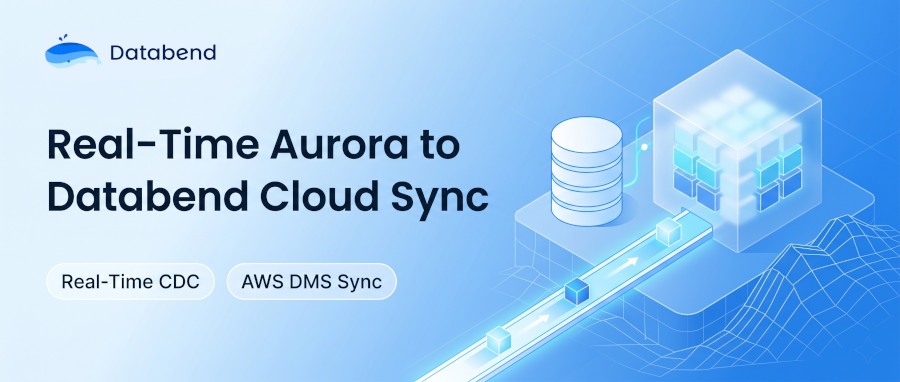
A step-by-step guide to building a near-real-time data pipeline from Amazon RDS MySQL / Aurora MySQL to Databend using AWS DMS and S3 as an intermediary. This approach delivers full-load migration plus ongoing CDC (Change Data Capture) with approximately one to two minutes of end-to-end latency.
Why This Approach?
Replicating production MySQL data into an analytical data Databend Cloud is a common requirement. This architecture keeps things simple and reliable:
- Fully managed — AWS DMS handles binlog parsing and data transport. No self-hosted CDC infrastructure required.
- Low latency — End-to-end delay of roughly 1–2 minutes.
- Durable — The raw layer retains a complete change log for auditing and disaster recovery.
- Easy to scale — Adding a new table is a repeatable, templated process with no architectural changes.
Architecture Overview
┌─────────────────────┐
│  RDS MySQL / Aurora │
│   (Source Database) │
└────────┬────────────┘
         │  Binlog
         ▼
┌─────────────────────┐
│     AWS DMS Task    │
│  (Full Load + CDC)  │
└────────┬────────────┘
         │  Parquet files
         ▼
┌──────────────────────┐
│      Amazon S3       │
│  (Staging area,      │
│   organized by table)│
└────────┬─────────────┘
         │  COPY INTO (scheduled task)
         ▼
┌──────────────────────┐
│   Databend Cloud     │
│  ┌───────────────┐   │
│  │   Raw Layer   │   │  ← Append-only; retains every change event
│  │ (Change Log)  │   │
│  └──────┬────────┘   │
│         │ Stream + MERGE INTO (event-driven)
│         ▼            │
│  ┌───────────────┐   │
│  │   ODS Layer   │   │  ← Latest state; clean business tables
│  │  (Merged)     │   │
│  └───────────────┘   │
└──────────────────────┘
Key design decisions:
- Raw layer — Append-only, never updated. Acts as a complete binlog replay buffer for auditing and disaster recovery. Retain for at least 15 days before purging.
- ODS layer — Reflects the current state of each record. Downstream queries hit this layer directly.
- Event-driven merges — A Stream detects new rows in the raw layer and triggers MERGE INTO only when there is data to process, avoiding unnecessary empty runs.
Prerequisites
| Component | Requirement |
|---|---|
| Source database | RDS MySQL 5.7+ / Aurora MySQL 2.x or 3.x with binlog enabled (binlog_format = ROW) |
| AWS DMS | Replication instance in the same VPC / Region as the source database |
| S3 bucket | Dedicated bucket (or prefix) in the same Region as the source |
| IAM role | DMS service role with S3 read/write/delete permissions on the target bucket |
| Databend Cloud | An active Warehouse with permissions to create Stages, Tasks, and Streams |
| Network | Databend Cloud can reach the S3 bucket (same-Region recommended to reduce cost and latency) |
IAM Role Configuration for DMS
The DMS service role requires two policies: a trust policy (who can assume the role) and a permissions policy (what the role can do).
Trust policy (IAM → Role → Trust relationships):
{
  "Version": "2012-10-17",
  "Statement": [
    {
      "Sid": "AWSDMSS3BucketPolicyTemplate",
      "Effect": "Allow",
      "Principal": {
        "Service": "dms.amazonaws.com"
      },
      "Action": "sts:AssumeRole",
      "Condition": {
        "StringEquals": {
          "aws:SourceAccount": "<your-aws-account-id>"
        }
      }
    }
  ]
}
Permissions policy (IAM → Role → Permissions → Create inline policy):
{
  "Version": "2012-10-17",
  "Statement": [
    {
      "Effect": "Allow",
      "Action": ["s3:PutObject", "s3:DeleteObject", "s3:GetObject"],
      "Resource": "arn:aws:s3:::<your-dms-bucket>/*"
    },
    {
      "Effect": "Allow",
      "Action": ["s3:ListBucket", "s3:GetBucketLocation"],
      "Resource": "arn:aws:s3:::<your-dms-bucket>"
    }
  ]
}
Note: The two statements are separated because object-level actions (
,
Step 1: Create the S3 Bucket
Create a dedicated S3 bucket (or use a dedicated prefix in an existing bucket) for DMS output.
aws s3 mb s3://your-dms-bucket --region ap-southeast-1
Step 2: Configure AWS DMS
2.1 Create a Replication Instance

In the AWS DMS console:
- Navigate to DMS → Replication instances → Create replication instance.
- Configure:
- Instance class: or higher (choose based on table count and throughput)dms.r5.large
- VPC: Same VPC as the source RDS / Aurora instance
- Multi-AZ: Recommended for production
- Allocated storage: 100 GB+ (DMS uses local disk as a buffer during CDC)
- Instance class:
2.2 Create the Source Endpoint (RDS MySQL / Aurora)
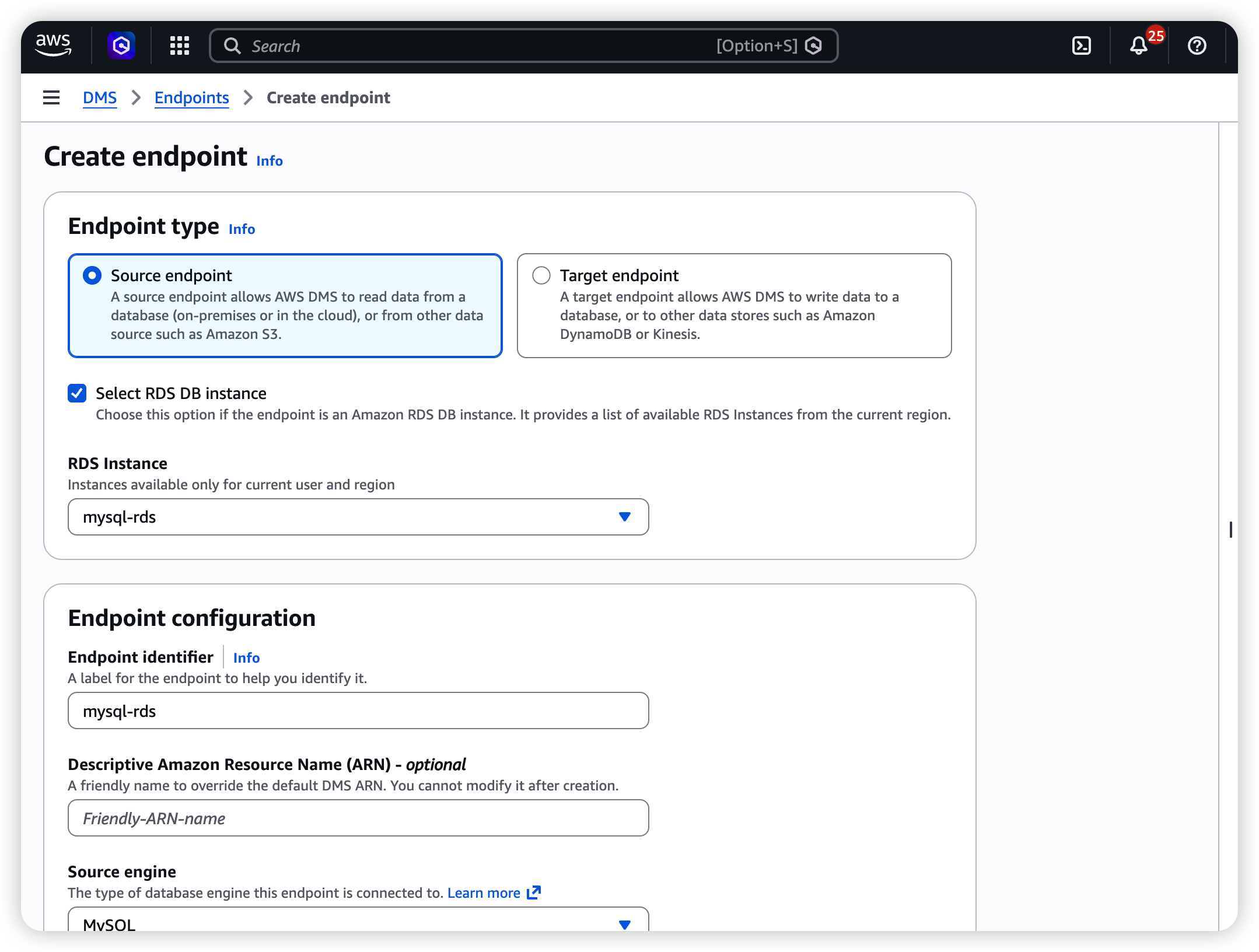
- Navigate to DMS → Endpoints → Create endpoint.
- Select Source endpoint.
- Configure:
| Field | Value |
|---|---|
| Endpoint type | Source |
| Engine | MySQL (select this for both RDS MySQL and Aurora MySQL) |
| Server name | RDS / Aurora endpoint (e.g., mydb.cluster-xxxx.ap-southeast-1.rds.amazonaws.com) |
| Port | 3306 |
| Username | A dedicated DMS replication user (see below) |
| Password | Password for the replication user |
| SSL mode | verify-ca recommended for production |
Create a dedicated replication user on the source database:
CREATE USER 'dms_user'@'%' IDENTIFIED BY 'your_secure_password';
GRANT SELECT, REPLICATION CLIENT, REPLICATION SLAVE ON *.* TO 'dms_user'@'%';
-- Aurora requires an additional grant:
GRANT EXECUTE ON PROCEDURE mysql.rds_set_configuration TO 'dms_user'@'%';
FLUSH PRIVILEGES;
Set the binlog retention period (applies to both Aurora and RDS MySQL):
-- Retain binlogs for 24 hours (adjust as needed)
CALL mysql.rds_set_configuration('binlog retention hours', 24);
Verify by running
to confirm logs exist and are not being purged prematurely.
2.3 Create the Target Endpoint (S3)
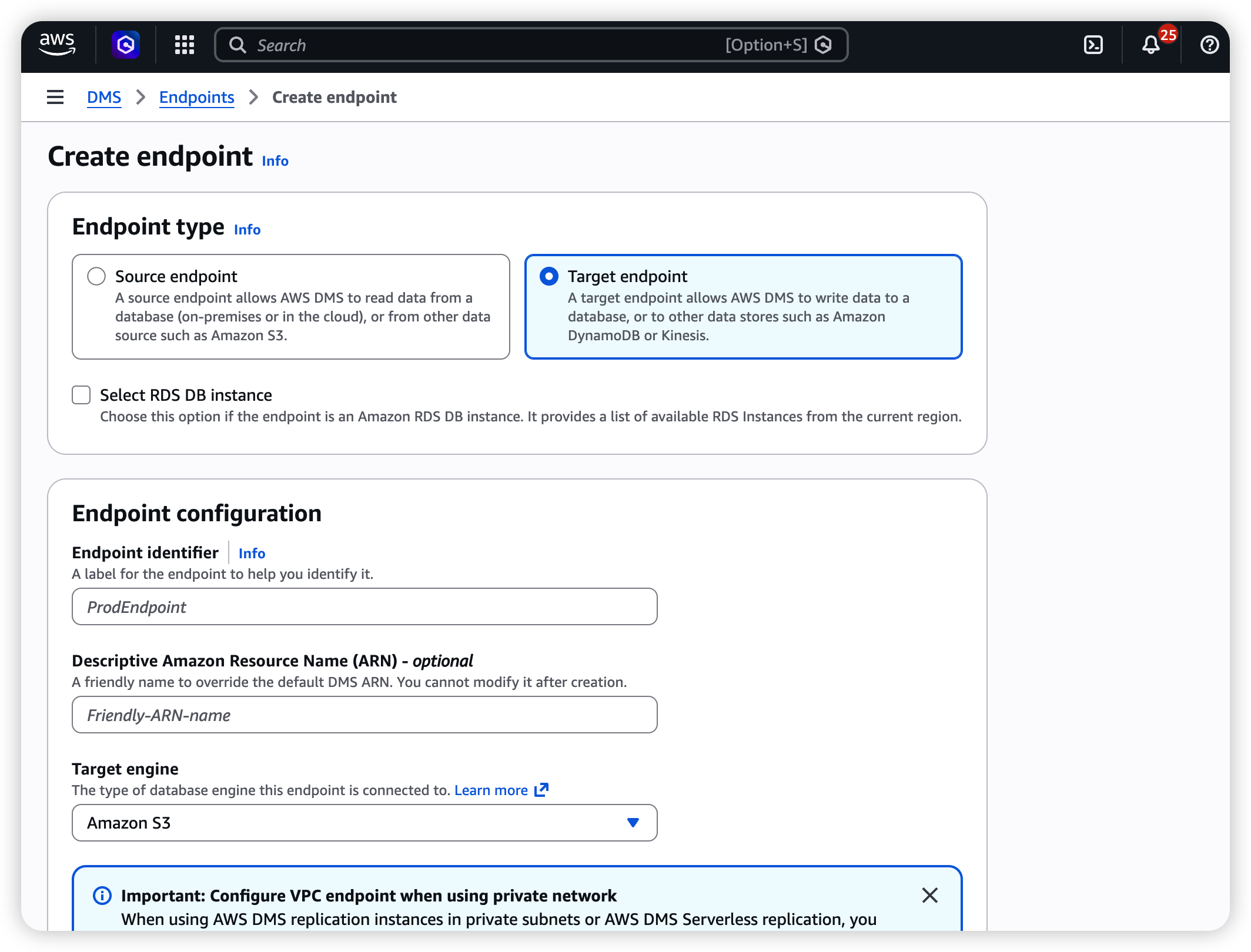
- Navigate to DMS → Endpoints → Create endpoint.
- Select Target endpoint.
- Configure:
| Field | Value |
|---|---|
| Endpoint type | Target |
| Engine | Amazon S3 |
| Service access role ARN | ARN of the IAM role with S3 write permissions |
| Bucket name | your-dms-bucket |
| Bucket folder | aurora/ (or your preferred prefix) |
| Data format | Parquet |
Extra connection attributes (paste into the "Extra connection attributes" field):
dataFormat=parquet;parquetVersion=PARQUET_2_0;timestampColumnName=_dms_ingestion_timestamp;includeOpForFullLoad=true;cdcInsertsAndUpdates=true;addColumnName=true;
Parameter reference:
| Parameter | Value | Purpose |
|---|---|---|
| | Output in Parquet format (good compression, self-describing schema) |
| | Use Parquet v2 for better type support |
| | Adds an ingestion timestamp column to every row |
| | Adds an Op column (set to I ) to full-load rows, keeping the raw layer schema consistent |
| | CDC output includes both INSERT and UPDATE operations |
| | Embeds column names in Parquet metadata |
2.4 Create the DMS Migration Task
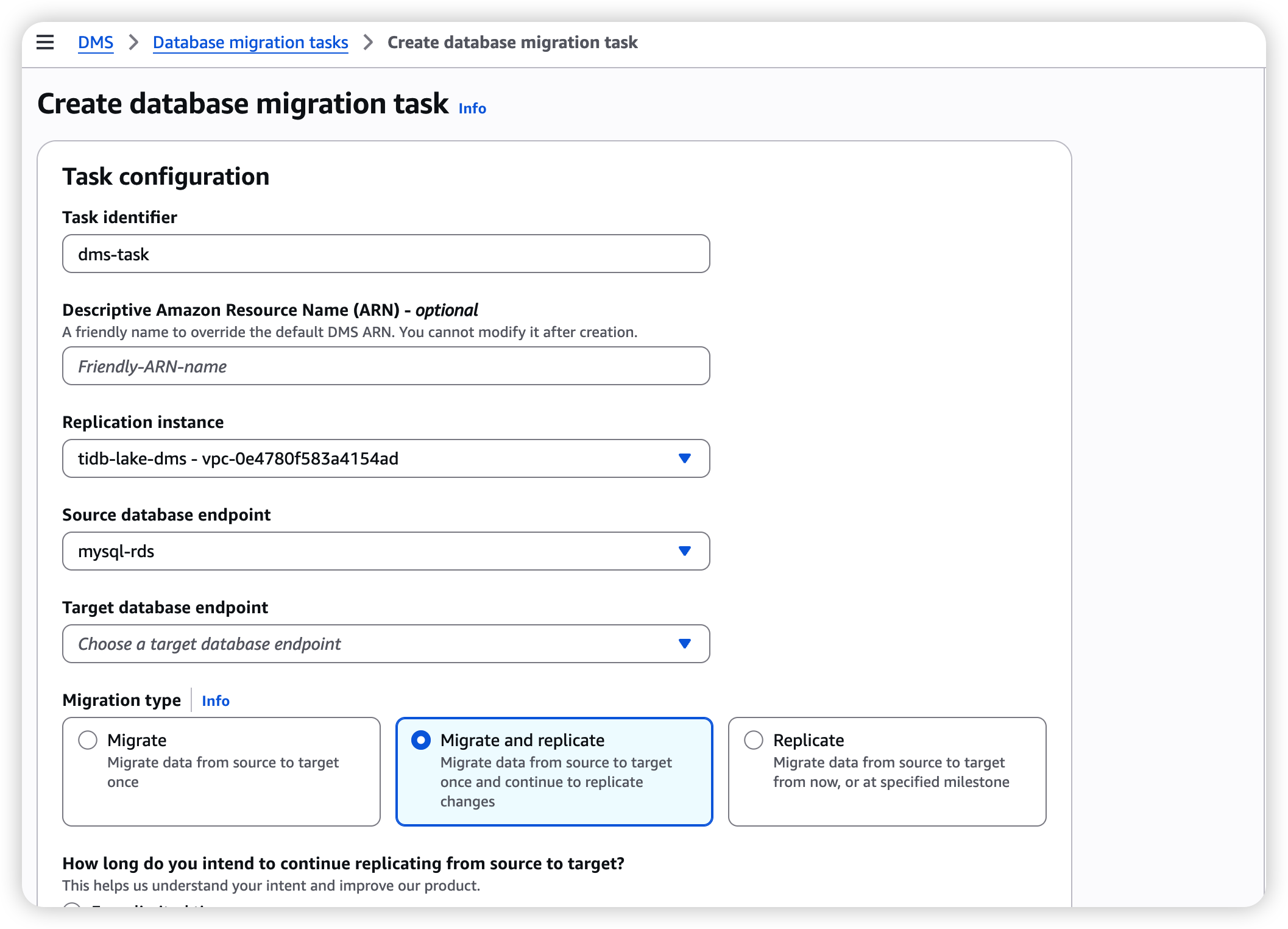
- Navigate to DMS → Database migration tasks → Create task.
- Configure:
| Field | Value |
|---|---|
| Task identifier | aurora-to-s3-full-cdc |
| Replication instance | The instance created in 2.1 |
| Source endpoint | The MySQL source endpoint from 2.2 |
| Target endpoint | The S3 target endpoint from 2.3 |
| Migration type | Migrate existing data and replicate ongoing changes (Full Load + CDC) |
- Table mappings — Use the JSON editor to sync all tables in a given schema:
{
  "rules": [
    {
      "rule-type": "selection",
      "rule-id": "1",
      "rule-name": "sync-all-tables",
      "object-locator": {
        "schema-name": "db",
        "table-name": "%"
      },
      "rule-action": "include"
    }
  ]
}
Replace
with your actual schema name.
- Task settings — Full configuration (key parameters annotated below):
{
  "TargetMetadata": {
    "TargetSchema": "",
    "SupportLobs": true,
    "FullLobMode": false,
    "LobChunkSize": 32,
    "LimitedSizeLobMode": true,
    "LobMaxSize": 32,
    "InlineLobMaxSize": 0,
    "LoadMaxFileSize": 0,
    "ParallelLoadThreads": 0,
    "ParallelLoadBufferSize": 0,
    "BatchApplyEnabled": false,
    "TaskRecoveryTableEnabled": false,
    "ParallelLoadQueuesPerThread": 0,
    "ParallelApplyThreads": 0,
    "ParallelApplyBufferSize": 0,
    "ParallelApplyQueuesPerThread": 0
  },
  "FullLoadSettings": {
    "CreatePkAfterFullLoad": false,
    "StopTaskCachedChangesApplied": false,
    "StopTaskCachedChangesNotApplied": false,
    "MaxFullLoadSubTasks": 8,
    "TransactionConsistencyTimeout": 600,
    "CommitRate": 10000
  },
  "Logging": {
    "EnableLogging": true,
    "EnableLogContext": false,
    "LogComponents": [
      { "Id": "SOURCE_UNLOAD", "Severity": "LOGGER_SEVERITY_DEFAULT" },
      { "Id": "SOURCE_CAPTURE", "Severity": "LOGGER_SEVERITY_DEFAULT" },
      { "Id": "TARGET_LOAD", "Severity": "LOGGER_SEVERITY_DEFAULT" },
      { "Id": "TARGET_APPLY", "Severity": "LOGGER_SEVERITY_DEFAULT" },
      { "Id": "TASK_MANAGER", "Severity": "LOGGER_SEVERITY_DEFAULT" }
    ],
    "CloudWatchLogGroup": null,
    "CloudWatchLogStream": null
  },
  "ControlTablesSettings": {
    "ControlSchema": "",
    "HistoryTimeslotInMinutes": 5,
    "HistoryTableEnabled": false,
    "SuspendedTablesTableEnabled": false,
    "StatusTableEnabled": false
  },
  "StreamBufferSettings": {
    "StreamBufferCount": 3,
    "StreamBufferSizeInMB": 8,
    "CtrlStreamBufferSizeInMB": 5
  },

  "ChangeProcessingDdlHandlingPolicy": {
    "HandleSourceTableDropped": true,
    "HandleSourceTableTruncated": true,
    "HandleSourceTableAltered": true
  },
  "ErrorBehavior": {
    "DataErrorPolicy": "LOG_ERROR",
    "DataTruncationErrorPolicy": "LOG_ERROR",
    "DataErrorEscalationPolicy": "SUSPEND_TABLE",
    "DataErrorEscalationCount": 0,
    "TableErrorPolicy": "SUSPEND_TABLE",
    "TableErrorEscalationPolicy": "STOP_TASK",
    "TableErrorEscalationCount": 0,
    "RecoverableErrorCount": -1,
    "RecoverableErrorInterval": 5,
    "RecoverableErrorThrottling": true,
    "RecoverableErrorThrottlingMax": 1800,
    "RecoverableErrorStopRetryAfterThrottlingMax": false,
    "ApplyErrorDeletePolicy": "IGNORE_RECORD",
    "ApplyErrorInsertPolicy": "LOG_ERROR",
    "ApplyErrorUpdatePolicy": "LOG_ERROR",
    "ApplyErrorEscalationPolicy": "LOG_ERROR",
    "ApplyErrorEscalationCount": 0,
    "ApplyErrorFailOnTruncationDdl": false,
    "FullLoadIgnoreConflicts": true,
    "FailOnTransactionConsistencyBreached": false,
    "FailOnNoTablesCaptured": true
  },
  "ChangeProcessingTuning": {
    "BatchApplyPreserveTransaction": true,
    "BatchApplyTimeoutMin": 1,
    "BatchApplyTimeoutMax": 30,
    "BatchApplyMemoryLimit": 500,
    "BatchSplitSize": 0,
    "MinTransactionSize": 1000,
    "CommitTimeout": 1,
    "MemoryLimitTotal": 1024,
    "MemoryKeepTime": 60,
    "StatementCacheSize": 50
  },
  "ValidationSettings": {
    "EnableValidation": false,
    "ValidationMode": "ROW_LEVEL",
    "ThreadCount": 5,
    "FailureMaxCount": 10000,
    "TableFailureMaxCount": 1000,
    "HandleCollationDiff": false,
    "ValidationOnly": false,
    "RecordFailureDelayLimitInMinutes": 0,
    "SkipLobColumns": false,
    "ValidationPartialLobSize": 0,
    "ValidationQueryCdcDelaySeconds": 0,
    "PartitionSize": 10000
  },
  "PostProcessingRules": null,
  "CharacterSetSettings": null,
  "LoopbackPreventionSettings": null,
  "BeforeImageSettings": null,
  "FailTaskWhenCleanTaskResourceFailed": false
}
Key settings explained:
| Setting | Value | Why it matters |
|---|---|---|
| | Critical. Must be false so DMS writes a per-row Op column (I/U/D) into the Parquet files. Setting this to true causes the Op column to be missing or incorrect. |
| | Enables CloudWatch logging for troubleshooting |
| | Number of parallel threads for the full load phase. Increase for large table counts. |
| | Automatically handles source-side DDL changes (add/drop columns, etc.) |
| | On error, only the affected table is suspended — the rest of the task continues |
| | Retries recoverable errors (network blips, throttling) indefinitely |
| | Skips duplicate-key errors during full load (safe for S3 targets) |
| | Truncates LOBs to 32 KB for better performance. Increase LobMaxSize if you have large TEXT/BLOB columns. |
- In the S3 target endpoint's extra connection attributes, add CDC tuning parameters:
| Parameter | Value | Purpose |
|---|---|---|
| 32 (KB) | Lowers the threshold so smaller files are flushed to S3 sooner |
| 30 (seconds) | Maximum interval before DMS flushes a CDC file to S3 |
DMS CDC end-to-end latency is typically 30–60 seconds. This is a DMS design trade-off, not a Databend bottleneck. Adjust these parameters based on your real-time requirements.
- Click Create task. The task will automatically begin the full load and switch to CDC mode once complete.
2.5 S3 Directory Structure
DMS automatically organizes files by schema and table name:
s3://dms-databend-bucket/
├── databend/
│   ├── orders/
│   │   ├── 20260416-124049492.parquet    ← Full-load file
│   │   └── 20260416-124049752.parquet
│   ├── table_b/
│   │   ├── 20260416-xxxxxxxxx.parquet
│   │   └── ...
│   └── ...
Columns automatically added by DMS in CDC Parquet files:
| Column | Type | Description |
|---|---|---|
| STRING | Operation type: I (Insert), U (Update), D (Delete) |
| TIMESTAMP | The time DMS captured the change |
| (all source columns) | (original types) | Your business data columns |
Step 3: Configure Databend Cloud
3.1 Create an External Stage Pointing to S3
-- Option A: Using Access Key / Secret Key
CREATE STAGE IF NOT EXISTS dms_s3_stage
    URL = 's3://dms-databend-bucket/databend/'
    CONNECTION = (
        AWS_KEY_ID     = '<your-access-key>',
        AWS_SECRET_KEY = '<your-secret-key>',
        REGION         = 'ap-southeast-1'
    );

-- Option B: Using an IAM Role ARN (recommended for production)
CREATE STAGE IF NOT EXISTS dms_s3_stage
    URL = 's3://dms-databend-bucket/databend/'
    CONNECTION = (
        ROLE_ARN = 'arn:aws:iam::123456789012:role/databend-s3-access',
        REGION   = 'ap-southeast-1'
    );
Verify the Stage can list files:
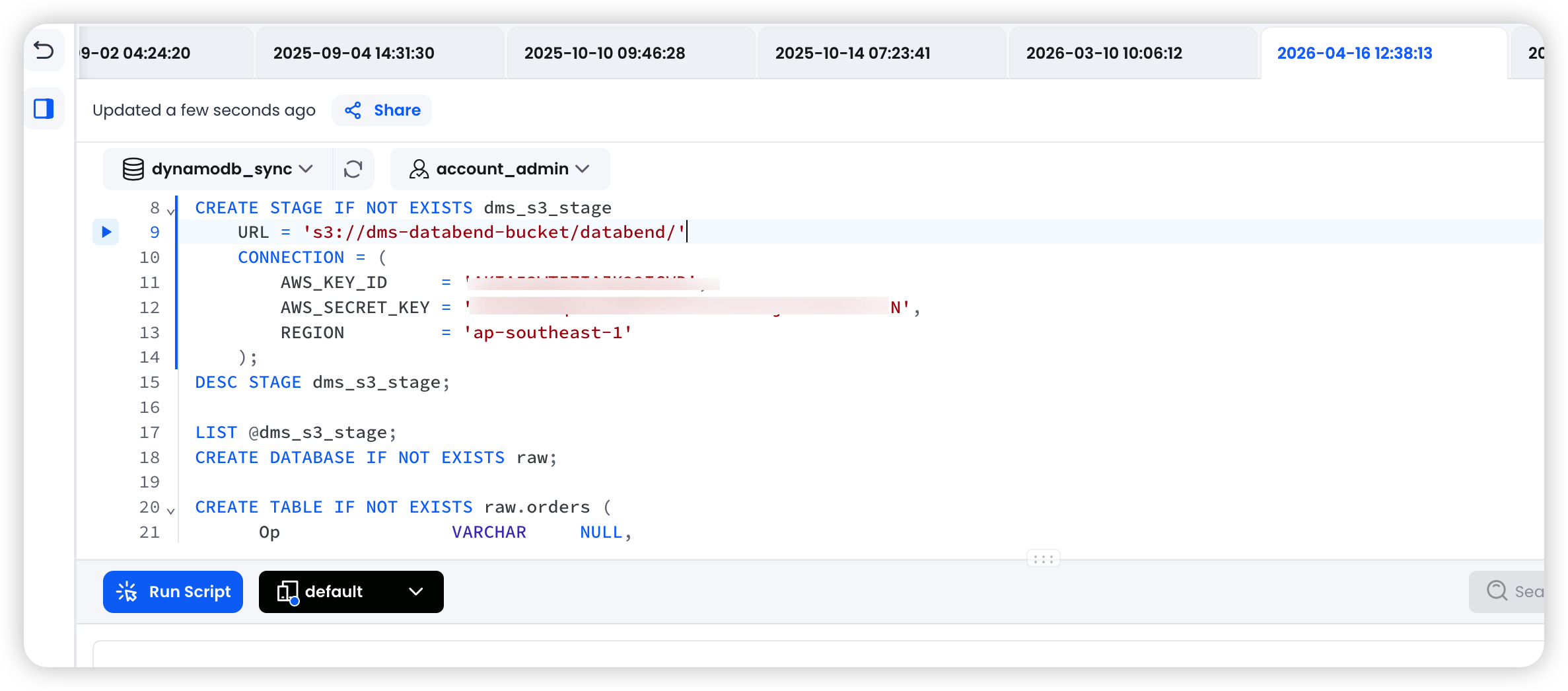
LIST @dms_s3_stage;
3.2 Create the Raw Layer Tables
The raw layer stores every change event from the DMS Parquet files as-is. Each source table maps to one raw table.
Design principles:
- Retain all original business columns plus DMS metadata columns (,Op)_dms_ingestion_timestamp
- Enable so new columns added at the source are picked up automaticallyENABLE_SCHEMA_EVOLUTION
- This layer is append-only — never update or delete rows here
Example: source table
orders
CREATE DATABASE IF NOT EXISTS raw;

CREATE TABLE IF NOT EXISTS raw.orders (
    -- DMS metadata columns
    Op                        VARCHAR     NULL,
    _dms_ingestion_timestamp  TIMESTAMP   NULL,

    -- Business columns (match the source table schema)
    order_id                  BIGINT      NULL,
    user_id                   BIGINT      NULL,
    product_id                BIGINT      NULL,
    quantity                  INT         NULL,
    amount                    DECIMAL(12,2) NULL,
    status                    VARCHAR     NULL,
    created_at                TIMESTAMP   NULL,
    updated_at                TIMESTAMP   NULL
) ENABLE_SCHEMA_EVOLUTION = true;
Repeat this step for each source table. Column names must exactly match the column names in the Parquet files.
3.3 Create the ODS Layer Tables
The ODS layer holds the latest state of each record — this is the clean business table that downstream queries should target.
CREATE DATABASE IF NOT EXISTS ods;

CREATE TABLE IF NOT EXISTS ods.orders (
    order_id    BIGINT        NOT NULL,
    user_id     BIGINT        NULL,
    product_id  BIGINT        NULL,
    quantity    INT           NULL,
    amount      DECIMAL(12,2) NULL,
    status      VARCHAR       NULL,
    is_deleted  BOOLEAN       NOT NULL DEFAULT false,   -- Soft-delete flag
    created_at  TIMESTAMP     NULL,
    updated_at  TIMESTAMP     NULL
);
Use soft deletes (
flag) rather than physical DELETEs. This preserves history and prevents data loss when a
Step 4: Initial Full Load
Full-load files land at
s3://dms-databend-bucket/databend/orders/
4.1 Load Full-Load Files into the Raw Layer
COPY INTO raw.orders
FROM @dms_s3_stage/orders/
PATTERN = '.*\.parquet'
FILE_FORMAT = (TYPE = PARQUET)
PURGE = TRUE;
4.2 Initial Merge into the ODS Layer
During the full load, every row has
Op = 'I'
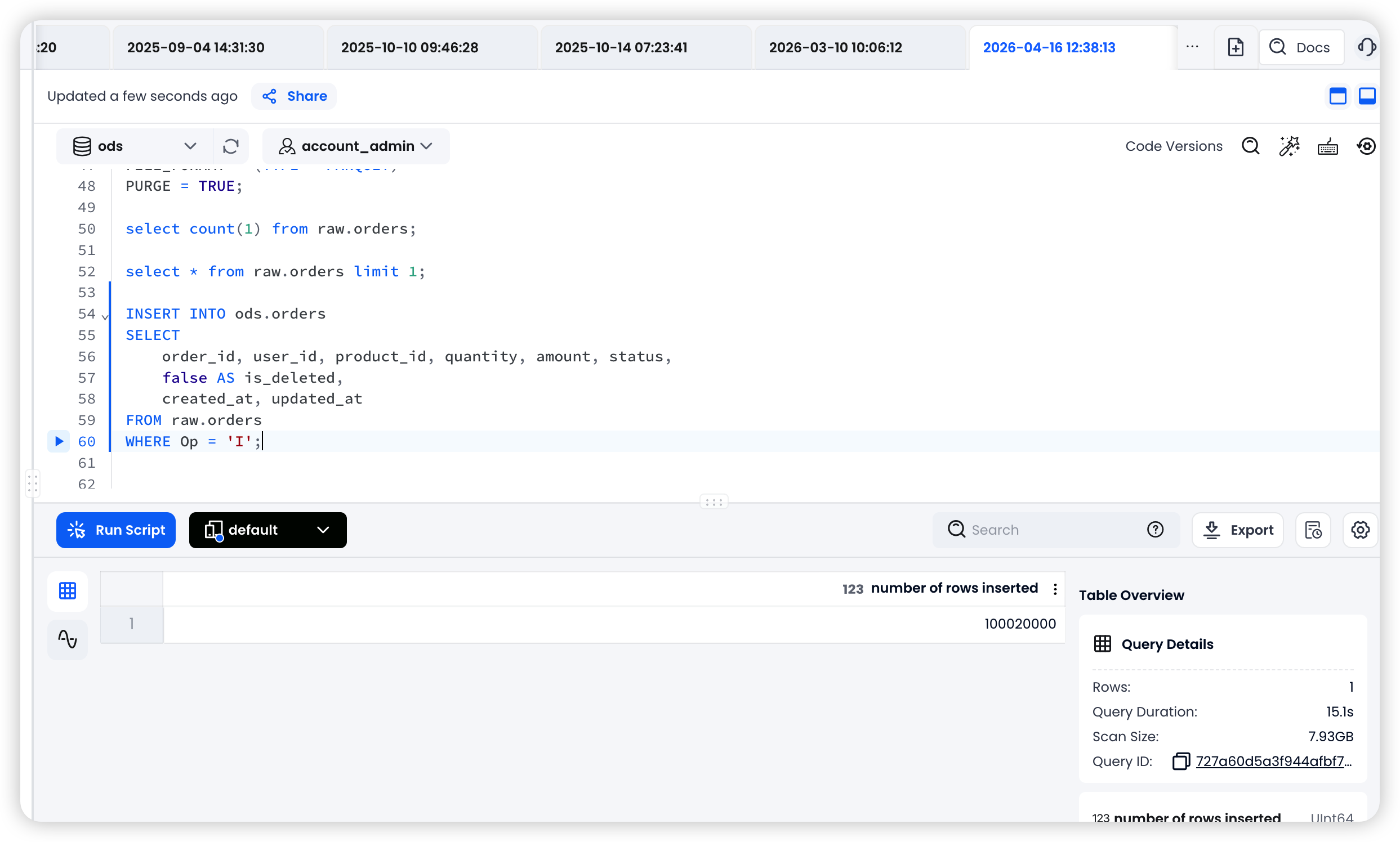
INSERT INTO ods.orders
SELECT
    order_id, user_id, product_id, quantity, amount, status,
    false AS is_deleted,
    created_at, updated_at
FROM raw.orders
WHERE Op = 'I';
Once the full load is complete and the ODS layer is populated, proceed to Step 5 to set up the CDC pipeline.
Step 5: Set Up the CDC Incremental Pipeline
5.1 Create a Stream on the Raw Layer Table
A Stream tracks newly appended rows in the raw table. After a MERGE INTO task consumes the Stream, the cursor advances automatically.
CREATE STREAM IF NOT EXISTS raw.stream_orders
    ON TABLE raw.orders
    APPEND_ONLY = TRUE;
5.2 Create Task 1 — COPY INTO the Raw Layer (Scheduled)
This task polls S3 on a schedule for new CDC Parquet files and loads them into the raw table. You can group multiple tables from the same business domain into a single task.
-- Single-table task
CREATE TASK load_orders_raw
    WAREHOUSE = 'default'
    SCHEDULE = 1 MINUTE
    SUSPEND_TASK_AFTER_NUM_FAILURES = 3
AS
    COPY INTO raw.orders
    FROM @dms_s3_stage/orders/
    PATTERN = '.*\.parquet'
    FILE_FORMAT = (TYPE = PARQUET)
    PURGE = TRUE
    ON_ERROR = CONTINUE;
Multi-table task example (grouped by business domain):
CREATE TASK load_databend_domain_raw
    WAREHOUSE = 'default'
    SCHEDULE = 1 MINUTE
    SUSPEND_TASK_AFTER_NUM_FAILURES = 3
AS
BEGIN
    COPY INTO raw.orders
    FROM @dms_s3_stage/orders/
    PATTERN = '.*\.parquet'
    FILE_FORMAT = (TYPE = PARQUET)
    PURGE = TRUE
    ON_ERROR = CONTINUE;

    -- Add more tables from the same domain here ...
END;
deletes S3 files after a successful load, preventing duplicate ingestion.
5.3 Create Task 2 — MERGE INTO the ODS Layer (Event-Driven)
This task fires after Task 1 completes and only runs when the Stream contains new data.
Important: the QUALIFY ROW_NUMBER() = 1 deduplication logic. Within a single CDC batch, the same primary key may appear multiple times (e.g., two consecutive UPDATEs). You must keep only the latest change per key; otherwise the MERGE result is non-deterministic.
CREATE TASK merge_orders
    WAREHOUSE = 'default'
    AFTER 'load_orders_raw'
    SUSPEND_TASK_AFTER_NUM_FAILURES = 3
AS
    MERGE INTO ods.orders AS target
    USING (
        SELECT * FROM (
            SELECT
                order_id,
                user_id,
                product_id,
                quantity,
                amount,
                status,
                created_at,
                updated_at,
                Op                       AS _op,
                _dms_ingestion_timestamp AS _ts
            FROM raw.stream_orders
        )
        QUALIFY ROW_NUMBER() OVER (
            PARTITION BY order_id
            ORDER BY _ts DESC
        ) = 1
    ) AS source
    ON target.order_id = source.order_id

    WHEN MATCHED AND source._op = 'D' THEN
        UPDATE SET target.is_deleted = true, target.updated_at = source.updated_at

    WHEN MATCHED AND source._op IN ('U', 'I') THEN
        UPDATE SET
            target.user_id    = source.user_id,
            target.product_id = source.product_id,
            target.quantity   = source.quantity,
            target.amount     = source.amount,
            target.status     = source.status,
            target.is_deleted = false,
            target.created_at = source.created_at,
            target.updated_at = source.updated_at

    WHEN NOT MATCHED AND source._op != 'D' THEN
        INSERT (order_id, user_id, product_id, quantity, amount, status, is_deleted, created_at, updated_at)
        VALUES (source.order_id, source.user_id, source.product_id, source.quantity,
                source.amount, source.status, false, source.created_at, source.updated_at);
MERGE logic breakdown:
| Condition | Action | Scenario |
|---|---|---|
| Soft delete (is_deleted = true) | The source row was deleted |
| Update all columns, reset is_deleted = false | The source row was updated (or re-inserted after a delete) |
| Insert a new row | A new row that doesn't yet exist in the ODS layer |
5.4 Start the Tasks
Start the child task first, then the parent task. This ensures the downstream task is ready before the upstream task begins producing data.
-- Step 1: Start the child task (MERGE)
ALTER TASK merge_orders RESUME;

-- Step 2: Start the parent task (COPY INTO)
ALTER TASK load_orders_raw RESUME;
To add a new table, repeat steps 3.2 → 3.3 → 5.1 → 5.2 → 5.3 → 5.4.
Step 6: Verification
6.1 Verify the DMS Task Status
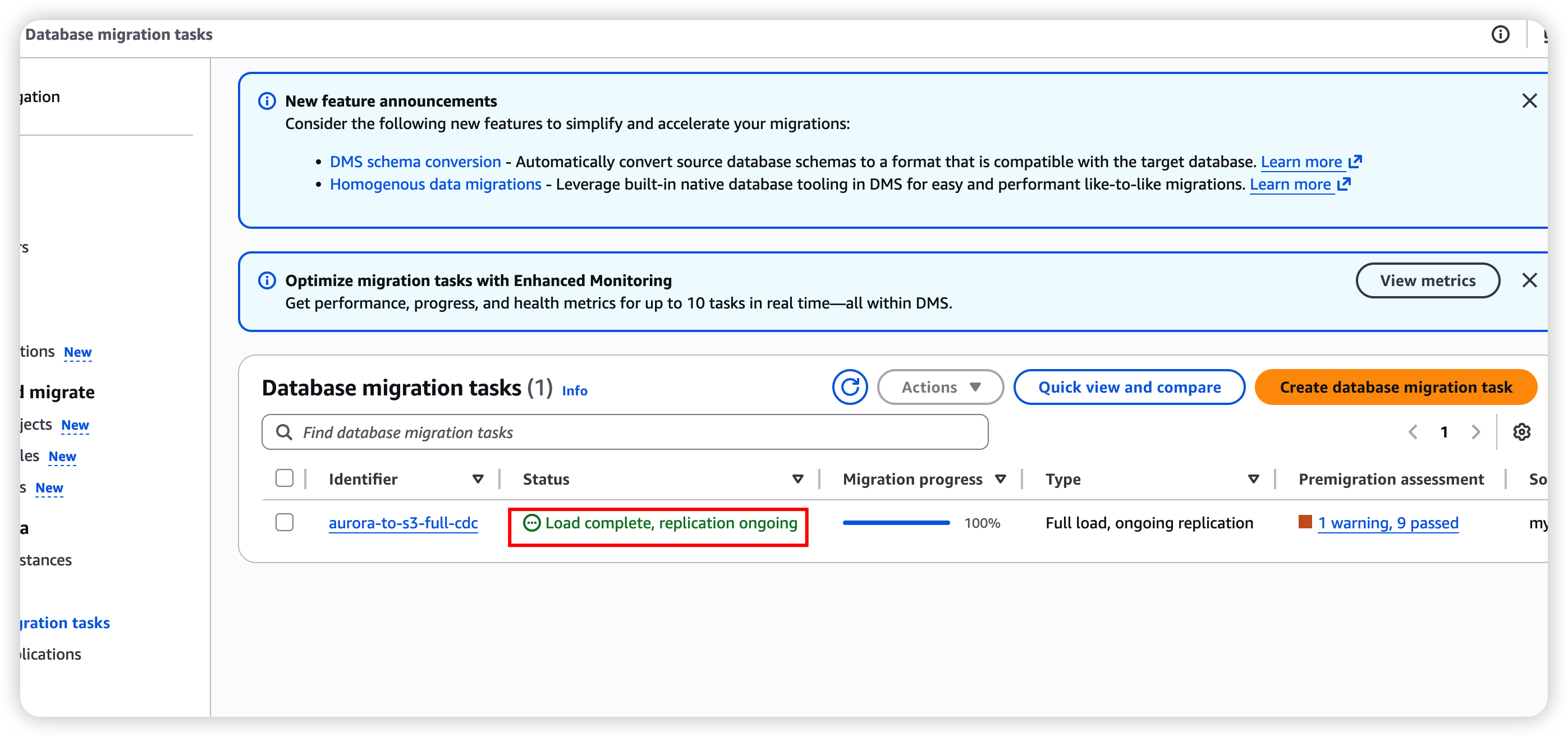
In the AWS DMS console, check that:
- Task status is Running (after the full load completes, it should show Load complete, replication ongoing)
- The Table statistics tab shows loaded row counts and CDC change counts
- CloudWatch logs contain no errors
# CLI check
aws dms describe-table-statistics \
    --replication-task-arn <your-task-arn> \
    --query 'TableStatistics[*].{Table:TableName,Inserts:Inserts,Updates:Updates,Deletes:Deletes,FullLoad:FullLoadRows}'
6.2 Verify S3 Files
# Confirm files are landing
aws s3 ls s3://dms-databend-bucket/databend/orders/ --recursive
6.3 Verify Databend Cloud Tasks
-- Check task status
SHOW TASKS;

-- View task execution history
SELECT *
FROM TABLE(TASK_HISTORY())
ORDER BY scheduled_time DESC
LIMIT 20;

-- Verify raw layer data
SELECT COUNT(*) FROM raw.orders;
SELECT * FROM raw.orders ORDER BY _dms_ingestion_timestamp DESC LIMIT 10;

-- Verify ODS layer data
SELECT COUNT(*) FROM ods.orders WHERE is_deleted = false;
SELECT * FROM ods.orders ORDER BY updated_at DESC LIMIT 10;

-- Check Stream status (should be empty after a successful merge)
SELECT COUNT(*) FROM raw.stream_orders;
6.4 End-to-End Validation
Run the following test operations on the source database in sequence. Wait 2–3 minutes between each step to allow DMS to flush to S3 and the Databend tasks to consume the data.
Step 1: INSERT — Run on the source RDS MySQL / Aurora
INSERT INTO db.orders (user_id, product_id, quantity, amount, status, created_at, updated_at)
VALUES (99999, 88888, 3, 4.4, 'pending', NOW(), NOW());

-- Note the auto-generated order_id for subsequent steps
SELECT LAST_INSERT_ID();
Verify on Databend Cloud (wait 2–3 minutes):
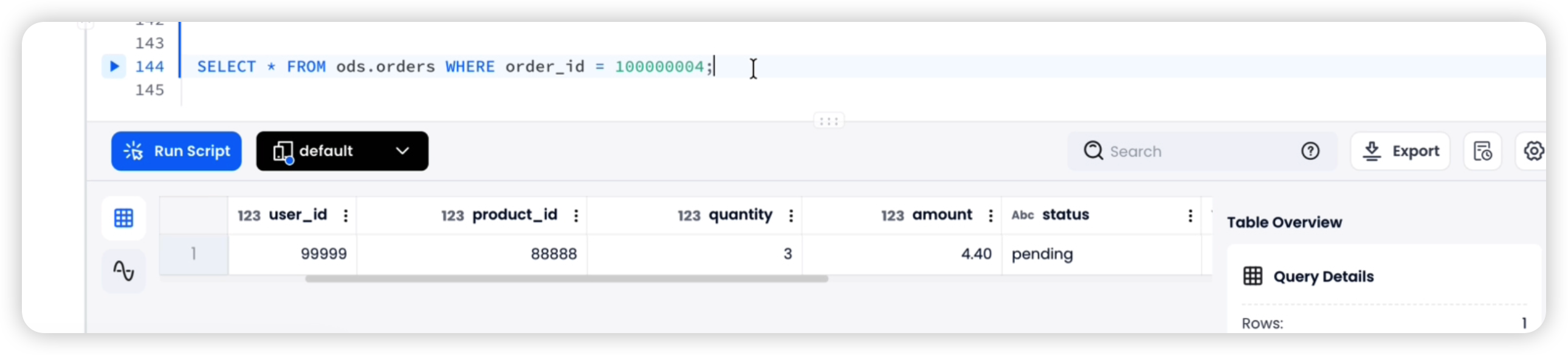
SELECT * FROM ods.orders WHERE order_id = 100000004;
-- Expected: status = 'pending', amount = 4.4, is_deleted = false
Step 2: UPDATE — Run on the source RDS MySQL / Aurora
UPDATE db.orders
SET status = 'paid', amount = 2.2, updated_at = NOW()
WHERE order_id = 100000004;
Verify on DatabendCloud (wait 2–3 minutes):
SELECT * FROM ods.orders WHERE order_id = 100000004;
-- Expected: status = 'paid', amount = 2.2, is_deleted = false
Step 3: DELETE — Run on the source RDS MySQL / Aurora
DELETE FROM db.orders WHERE order_id = 100000004;
Verify on Databend Cloud (wait 2–3 minutes):
SELECT * FROM ods.orders WHERE order_id = 100000004;
-- Expected: is_deleted = true
Clean up test data:
DELETE FROM ods.orders WHERE order_id = 100000004;
DELETE FROM raw.orders WHERE order_id = 100000004;
Step 7: Operations and Maintenance
7.1 Common Operations
-- Suspend tasks (parent first, then child)
ALTER TASK load_orders_raw SUSPEND;
ALTER TASK merge_orders SUSPEND;

-- Resume tasks (child first, then parent)
ALTER TASK merge_orders RESUME;
ALTER TASK load_orders_raw RESUME;

-- Manually trigger a task (useful for debugging)
EXECUTE TASK load_orders_raw;

-- Inspect unconsumed Stream data
SELECT * FROM raw.stream_orders LIMIT 10;
7.2 Raw Layer Data Retention
The raw layer grows continuously. Set up a scheduled cleanup task (retain at least 15 days):
-- Manual cleanup
DELETE FROM raw.orders
WHERE _dms_ingestion_timestamp < DATEADD(DAY, -15, NOW());

-- Or create a scheduled cleanup task
CREATE TASK cleanup_raw_orders
    WAREHOUSE = 'default'
    SCHEDULE = USING CRON '0 3 * * *'    -- Runs daily at 3:00 AM
AS
    DELETE FROM raw.orders
    WHERE _dms_ingestion_timestamp < DATEADD(DAY, -15, NOW());

ALTER TASK cleanup_raw_orders RESUME;
Troubleshooting
| Problem | Symptom | Solution |
|---|---|---|
Missing | Dirty or inconsistent data in the ODS layer | The USING subquery in MERGE must deduplicate by primary key, keeping only the latest change per key |
| Physical DELETE instead of soft delete | Historical data lost, no audit trail | Use an is_deleted flag in the ODS layer; set the flag to true when |
| Skipping the raw layer and writing directly to ODS | No way to replay or recover from a bad merge | Always keep the raw layer as the source of truth. Retain for at least 15 days. |
| DDL changes not propagated | COPY INTO fails to parse new Parquet columns | Enable ENABLE_SCHEMA_EVOLUTION = true on raw tables; manually add new columns to ODS tables |
| Timezone mismatch | updated_at values differ between source and Databend | DMS defaults to UTC. Ensure the source database also uses UTC, or handle timezone conversion explicitly. |
| Character encoding issues | Garbled text in Databend | Ensure the source database uses UTF-8. Parquet format handles encoding automatically in DMS. |
| Op column missing or incorrect in CDC files | Set BatchApplyEnabled to false in the DMS task settings |
| S3 files not being cleaned up | Duplicate data in the raw layer | Ensure PURGE = TRUE is set in COPY INTO; verify the IAM role has s3:DeleteObject permission |
| Full-load and CDC paths overlap | Full-load files reprocessed as CDC | Use cdcPath=cdc/ in the S3 endpoint settings to separate full-load and CDC directories |
Appendix A: Adding a New Table — Checklist
For each new source table you want to sync, repeat the following steps:
| Step | What to customize |
|---|---|
| 3.2 — Raw table | Column names and types to match the source table |
| 3.3 — ODS table | Column names and types to match the source table, plus is_deleted |
| 4.1 — Full-load COPY INTO | S3 path to match the table's directory |
| 5.1 — Stream | Stream name and target raw table |
| 5.2 — Task 1 (COPY INTO) | S3 path and raw table name |
| 5.3 — Task 2 (MERGE INTO) | All column references, the ON clause, and the PARTITION BY primary key |
| 5.4 — Start tasks | Task names |
Appendix B: DMS Type Mapping to Databend Cloud
| MySQL Type | DMS Parquet Type | Databend Type |
|---|---|---|
| TINYINT | INT32 | TINYINT |
| SMALLINT | INT32 | SMALLINT |
| INT | INT32 | INT |
| BIGINT | INT64 | BIGINT |
| FLOAT | FLOAT | FLOAT |
| DOUBLE | DOUBLE | DOUBLE |
| DECIMAL(p,s) | FIXED_LEN_BYTE_ARRAY | DECIMAL(p,s) |
| VARCHAR(n) | BYTE_ARRAY (UTF8) | VARCHAR |
| TEXT | BYTE_ARRAY (UTF8) | VARCHAR |
| DATE | INT32 (DATE) | DATE |
| DATETIME | INT64 (TIMESTAMP_MILLIS) | TIMESTAMP |
| TIMESTAMP | INT64 (TIMESTAMP_MILLIS) | TIMESTAMP |
| BOOLEAN / TINYINT(1) | BOOLEAN | BOOLEAN |
| JSON | BYTE_ARRAY (UTF8) | VARIANT |
| BLOB | BYTE_ARRAY | VARCHAR (base64) |
Appendix C: Latency Estimates by Stage
| Stage | Typical Latency |
|---|---|
| Source database → DMS (binlog read) | 1–5 seconds |
| DMS → S3 (CDC file flush) | 30–60 seconds (controlled by cdcMaxBatchInterval) |
| S3 → Databend raw layer (COPY INTO task) | 1 minute (task schedule interval, adjustable) |
| Raw → ODS (MERGE INTO task) | Triggers immediately after COPY INTO completes |
| End-to-end | ~1–2 minutes |
The primary source of latency is the DMS CDC batch interval. To reduce latency, lower cdcMaxBatchInterval (minimum 60 seconds) and cdcMinFileSize.
Conclusion
This architecture combines AWS DMS, S3, and Databend to deliver near-real-time replication from MySQL/Aurora to a cloud data warehouse. The core design principles are:
- Layered storage — The raw layer retains a complete change log; the ODS layer maintains the latest state.
- Event-driven processing — Streams avoid unnecessary empty runs by triggering merges only when new data arrives.
- Idempotent design — PURGE = TRUE prevents duplicate ingestion; QUALIFY ROW_NUMBER() guarantees deduplication.
- Soft deletes — Preserve data integrity and support auditing and historical lookups.
Once the pipeline is in place, onboarding a new table is a simple, repeatable process with minimal operational overhead.
A 1-Minute Latency CDC Pipeline from RDS MySQL to Databend Cloud
Get started in minutes with Databend Cloud—the agent-ready data warehouse for analytics, search, AI, and Python Sandbox—and receive $200 in free credits.
Subscribe to our newsletter
Stay informed on feature releases, product roadmap, support, and cloud offerings!