
Databend MCP: Production Read-Only + Sandbox Verification for Safe AI Data Operations
 DatabendLabsJan 28, 2026

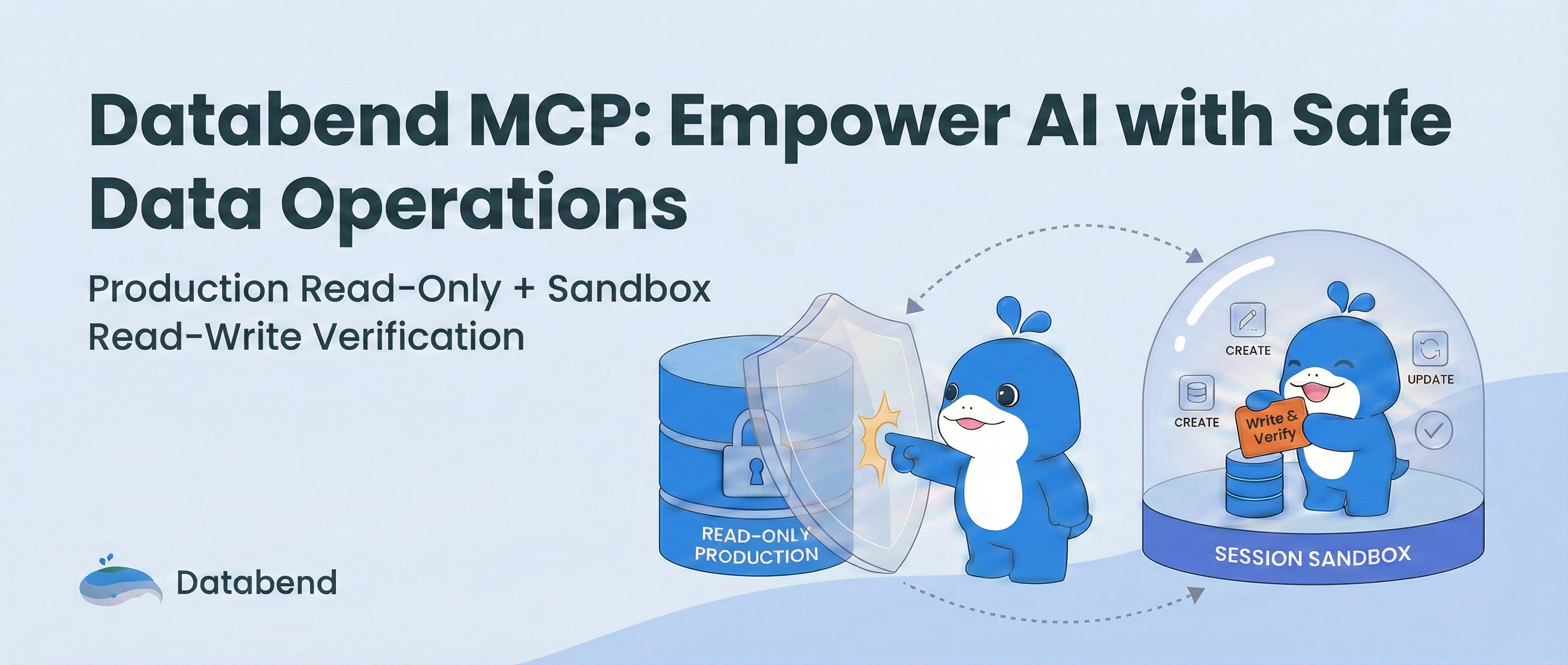
MCP (Model Context Protocol) is reshaping how AI connects with data services. In database scenarios, however, balancing open data access with strict security is often a delicate challenge. How can we empower AI with full data processing and logic verification capabilities without compromising the security of production data?
Databend MCP offers a solution: Production Read-Only + Session Sandbox.
🛡️ The Core of Safety: Session Sandbox
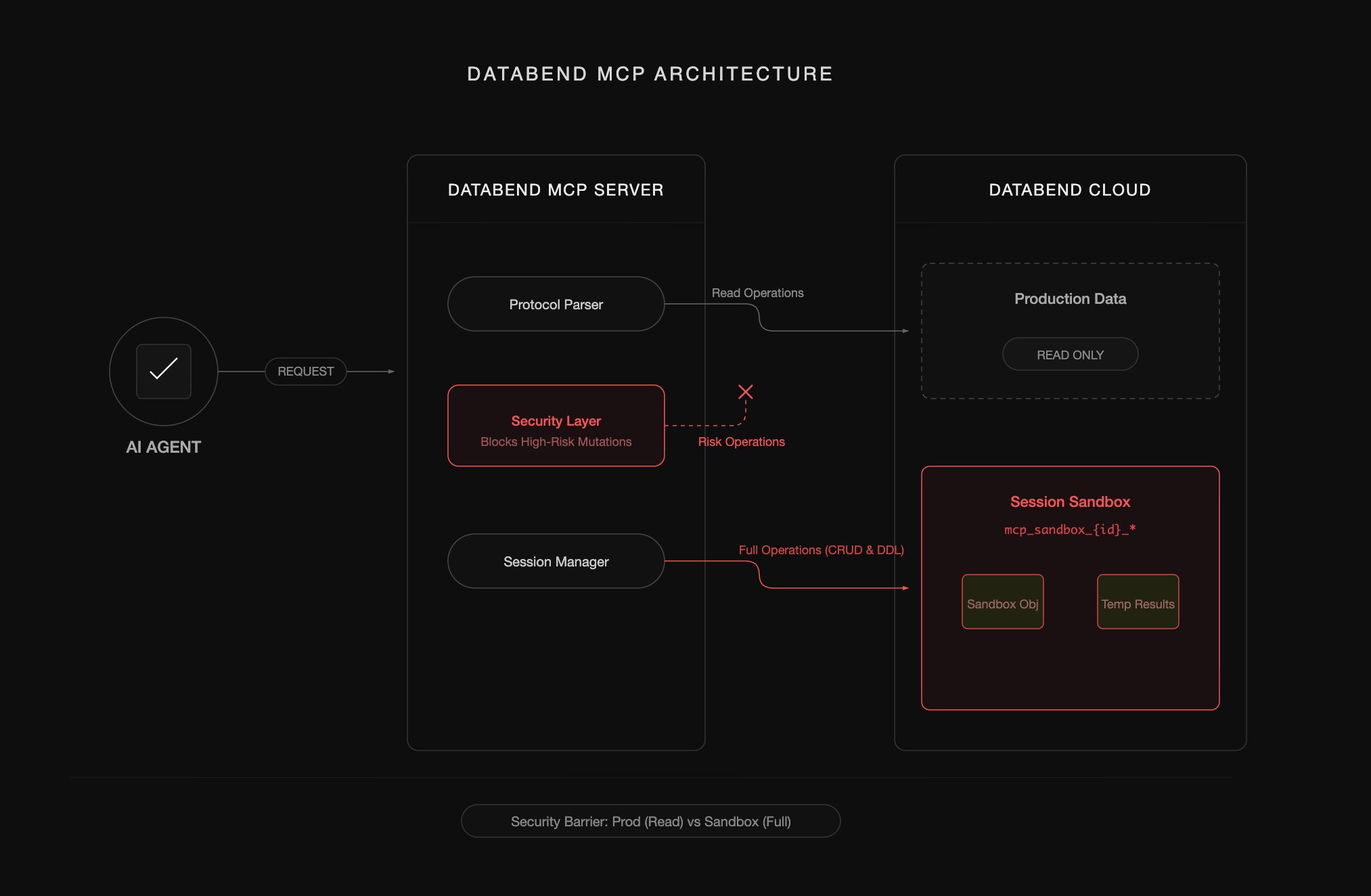
To resolve the conflict between security and capability, Databend MCP introduces the "Session Sandbox" mechanism. By strictly enforcing permission boundaries, it ensures absolute operational safety:
- Read-Only Production: For production environment objects, only read operations like ,SELECT, andSHOWare permitted. Any attempt to modify production data—such asDESCRIBE,UPDATE, orDELETE—will be intercepted and blocked by the server.DROP
- Isolated Sandboxes: Each MCP session is assigned a unique, isolated namespace prefix: .mcp_sandbox_{session_id}_
- Write Isolation: All data writing and modification operations (e.g., creating temporary tables, ETL cleaning) are restricted exclusively to the sandbox prefix belonging to that session.
✅ Safety Guarantees (Supported Commands)
Databend MCP implements a strict allowlist mechanism. The supported commands are as follows:
1. Allowed Read Operations (Global Read-Only):
- ,SELECT,SHOW,DESCRIBE,EXPLAINLIST
2. Supported Object Types:
- ,CATALOG,DATABASE,TABLE,VIEWSTAGE
- ,FUNCTION,USER,ROLETASK
- ,PIPE,STREAMCONNECTION
- ,WAREHOUSESEQUENCE
- ,PROCEDUREDICTIONARY
- ,TAGFILE FORMAT
- ,NETWORK POLICY,PASSWORD POLICY,MASKING POLICYROW ACCESS POLICY
- ,NOTIFICATION INTEGRATIONWORKLOAD GROUP
- ,DYNAMIC TABLEINDEX
3. Allowed Write Operations (Sandbox Only):
- ,CREATE,CREATE OR REPLACE,DROPALTER
- ,INSERT,UPDATE,DELETE,TRUNCATE,COPY,MERGEREPLACE
- ,GRANTREVOKE
⚠️ Note: All write operations are strictly limited to objects prefixed with
.
Why is "Read-Only" Not Enough?
If we grant AI only read permissions, it becomes helpless when facing complex data tasks. Real-world data processing is rarely just about "querying"—it involves "cleaning," "transforming," and "verifying."
- Cannot Verify Logic: If AI generates orDELETElogic but cannot actually run it, there is no way to confirm its correctness.UPDATE
- Cannot Staging Data: Complex analysis often requires creating temporary tables to store intermediate results. Read-only permissions directly block this path.
The Session Sandbox bridges this gap, enabling AI to complete the full "Sampling -> Simulation -> Verification" loop within an isolated environment.
🔧 Core Capabilities: Full-Link Verification
Building on the secure sandbox architecture, Databend MCP provides AI with comprehensive data interaction capabilities:
- Schema Discovery: Automatically retrieves table structures, field types, and function metadata helping AI understand data semantics.
- SQL Execution & Verification: Supports multi-statement execution, allowing complex ETL logic to run within the sandbox with immediate feedback.
- Resource & Connection Management: Supports managing databases, internal stages, and various connections within the sandbox, meeting diverse task requirements.
🛠️ Available Tools
execute_sql
execute_multi_sql
show_databases
show_tables
describe_table
show_stages
list_stage_files
create_stage
show_connections
get_session_sandbox_prefix
list_session_sandbox_databases
create_session_sandbox_database
💡 Practical Scenario: Getting Verified Stream Usage
For features you might be unfamiliar with (like Databend Stream), you can ask the Agent directly for usage examples. The Agent won't hallucinate; instead, it will write code, run verification, and then return the result—all within the sandbox.
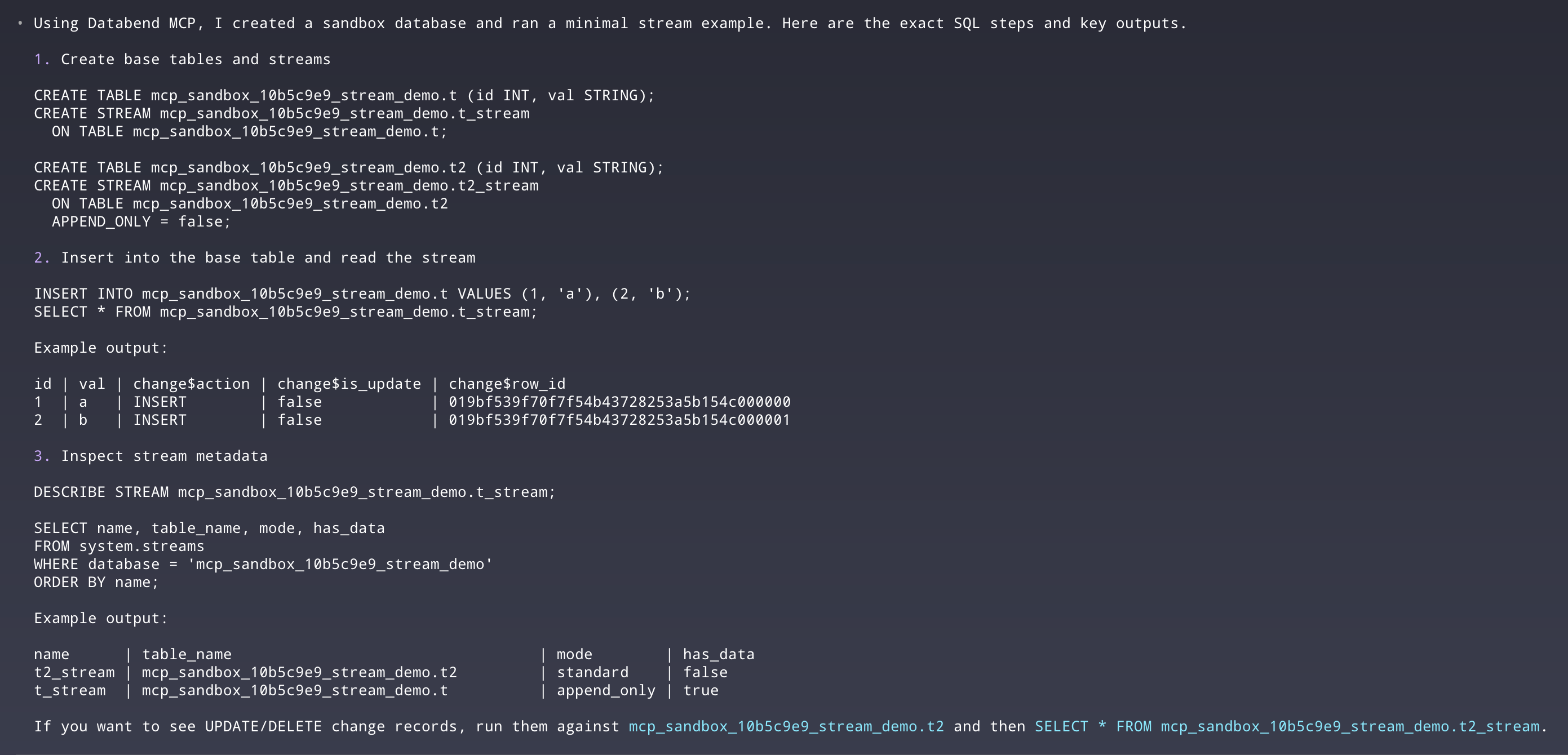
The following example demonstrates the entire interaction process:
1. User Prompt:
"Please use Databend MCP to provide an example of how to use Databend Stream, and verify it."
2. MCP Execution (Auto-Verification): The Agent automatically constructs test cases in the sandbox to ensure the provided example is 100% functional:
- Build: Creates a test table and a corresponding streamuser_log.user_log_stream
- Verify: Inserts data to simulate business changes and queries the Stream to confirm successful capture.
3. Final Response: The Agent summarizes the verified SQL and execution results, returning a reliable developer guide.
Need AI data operations verified without touching production?
Get started in minutes with Databend Cloud—the agent-ready data warehouse for analytics, search, AI, and Python Sandbox—and receive $200 in free credits.
🚀 Quick Start (Supported Clients)
Databend MCP is compatible with standard protocols and supports direct integration with mainstream AI development tools.
⚠️ Prerequisite: Please ensure uv (Python package manager) is installed.
Simply configure the DSN to get started.
Codex CLI
codex mcp add databend \
  --env DATABEND_DSN='databend://user:password@host:port/database?warehouse=your_warehouse' \
  -- uv tool run --from mcp-databend@latest mcp-databend
Claude Code CLI
claude mcp add databend \
  --env DATABEND_DSN='databend://user:password@host:port/database?warehouse=your_warehouse' \
  -- uv tool run --from mcp-databend@latest mcp-databend
Cursor
Add configuration in Settings -> MCP:
- Name: Databend
- Command: uv tool run --from mcp-databend@latest mcp-databend
- Env: DATABEND_DSN=databend://user:password@host:port/database?warehouse=your_warehouse
Conclusion
Through its "Production Read-Only + Sandbox Read-Write" architecture, Databend MCP guarantees the absolute security of production data while providing AI with the necessary experimental environment. This not only resolves data security concerns but also truly empowers AI to build reliable Data Pipelines.
- GitHub: databendlabs/mcp-databend
- Docs: Connect AI Agents
Subscribe to our newsletter
Stay informed on feature releases, product roadmap, support, and cloud offerings!