
 TCeason


Why Credential Lifetime and Trust Both Matter
On November 9, 2026, Wiz published an investigation into Qubole cross-account access. Between October 14 and 26, an attacker used credentials associated with Qubole's AWS account to assume roles in customer accounts and access resources, including S3 data. Most of the roles the attacker assumed had no other observed use during the investigation period, but their trust policies remained active.
The incident illustrates a problem that outlasts any individual connection: a service can fall out of use while its authorization remains valid. Choosing temporary credentials reduces long-term key distribution, but administrators still need to limit permissions, protect the trusted identity, and remove obsolete trust relationships.
For this example, Databend Cloud receives read access to one S3 prefix. The bucket stays private, and the existing SQL workflow for querying and loading files remains available.
How Role-Based S3 Access Works
Amazon S3, launched in 2006, stores files as objects in buckets and exposes APIs for uploading and reading them. Databend Cloud is a fully managed, cloud-native lakehouse for analytics; it can query S3 files with SQL or load them into tables. AWS Identity and Access Management (IAM) determines which identities can perform those operations on private data.
An IAM user can have long-term programmatic access keys. The Access Key ID identifies the key, and the Secret Access Key signs requests. Together, these are often abbreviated as AK/SK. Configuring them in a connection is straightforward and broadly compatible, and IAM policies can restrict their permissions. The operational burden is tracking where the keys are stored and used.
A SQL statement copied into a support ticket can expose a secret. Reusing a key across several jobs makes rotation harder because every consumer needs an update. Long-term access keys do not expire like session credentials; a copy left in source code, logs, or backups remains a risk until the key is deactivated.
With a role, the AWS administrator defines who can assume it and which resources it can access. Databend Cloud calls
AssumeRole

The diagram shows the authorization flow, not the network deployment topology.
A dedicated read-only role also gives administrators a specific authorization to maintain or retire. Data engineers use its Amazon Resource Name (ARN), a resource identifier that does not grant access by itself. This removes the need to distribute and periodically replace a long-term secret for this integration.
Roles still require least-privilege policies. IAM users support fine-grained permissions too; the benefit here is the reduced dependence on long-lived keys and the use of expiring sessions. Initial role setup takes more work than entering AK/SK, while ongoing administration centers on the role's permissions and trust policy.
1. Prepare the Data and Identity Information
You need:
- A Databend Cloud organization and permission to create connections, stages, and tables.
- A private S3 bucket for the sample file.
- An AWS identity with permission to create IAM policies and roles.
An AWS administrator can complete the policy and role setup before the data engineer creates the Databend objects.
The examples use
s3://databend-toronto/load/
us-east-2
load/books.parquet
Identify the Databend Cloud Principal
Select the target organization in Databend Cloud. On its overview page, look under Connections > Connection Information for Role ARN and copy the value if it is available.

This ARN identifies the Databend Cloud principal that will request access. It belongs in the AWS role's trust policy. Do not construct it from a DSN or copy it from another organization. If the interface does not show it, ask support to confirm role-access support for the organization and provide the correct principal.
Confirm the External ID
Use the External ID provided for your organization by Databend Cloud or confirmed by its support team. AWS recommends that third-party providers assign unique External IDs to different customers. Reusing a sample value, or generating a random string yourself, does not establish the required customer binding. The AWS trust policy and Databend connection must use the same value.
An External ID is an additional condition on role assumption that identifies the customer on whose behalf the service is acting. It helps prevent the confused deputy problem, where another customer induces the service to access your resources. AWS does not treat it as a secret, and it grants no S3 permissions on its own. The attacker in the Wiz investigation supplied External IDs as well, so this condition cannot compensate for a compromised trusted principal.
Amazon SQS (S3) data sources have a separate setup process. Do not reuse their platform role or External ID here. Identity configuration for self-hosted Databend is also outside this walkthrough's scope.
2. Create a Read-Only IAM Role
A permissions policy defines what the role can do. A trust policy defines who can assume it. Configure both.
Restrict Reads to the S3 Prefix
In AWS, open IAM > Policies > Create policy > JSON. Replace the bucket and prefix in this policy with your own values:
{
  "Version": "2012-10-17",
  "Statement": [
    {
      "Effect": "Allow",
      "Action": "s3:GetBucketLocation",
      "Resource": "arn:aws:s3:::databend-toronto"
    },
    {
      "Effect": "Allow",
      "Action": "s3:ListBucket",
      "Resource": "arn:aws:s3:::databend-toronto",
      "Condition": {
        "StringLike": {
          "s3:prefix": ["load/", "load/*"]
        }
      }
    },
    {
      "Effect": "Allow",
      "Action": "s3:GetObject",
      "Resource": "arn:aws:s3:::databend-toronto/load/*"
    }
  ]
}
Save it as
databend-docs-s3-read
load/

The AWS screenshots come from a separate test environment and show a different bucket name. Use your own values.
s3:ListBucket
s3:GetObject
Define Who Can Assume the Role
Open IAM > Roles > Create role > Custom trust policy and enter:
{
  "Version": "2012-10-17",
  "Statement": [
    {
      "Effect": "Allow",
      "Principal": {
        "AWS": "<databend-cloud-principal-arn>"
      },
      "Action": "sts:AssumeRole",
      "Condition": {
        "StringEquals": {
          "sts:ExternalId": "<your-unique-external-id>"
        }
      }
    }
  ]
}
Replace
Principal.AWS
Principal
*
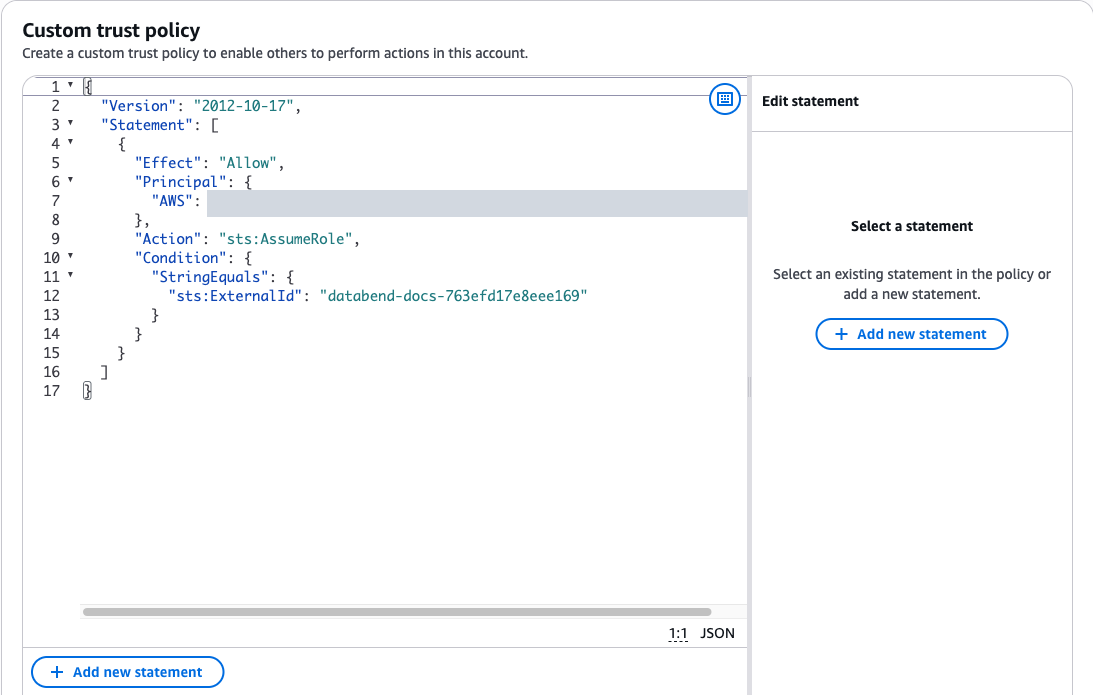
The principal is redacted in the screenshot. Its External ID is a test value and must not be reused in production.
Attach
databend-docs-s3-read
databend-docs-s3-role

There are now two ARNs with different purposes:
| ARN | Where to use it | Meaning |
|---|---|---|
| Databend Cloud principal ARN | | Who may assume the role |
| Newly created IAM role ARN | | Which role to assume |
3. Create the Connection and Stage
Run the following in a Databend Cloud worksheet or through BendSQL with the appropriate permissions:
CREATE CONNECTION s3_books_role_conn
    STORAGE_TYPE = 's3'
    ROLE_ARN = 'arn:aws:iam::987***987:role/databend-docs-s3-role'
    EXTERNAL_ID = '<your-unique-external-id>'
    REGION = 'us-east-2';
The masked account ID in the example is not executable as written. Replace the entire role ARN with your own, replace the External ID placeholder, and match the region to your bucket. Setting
EXTERNAL_ID
The connection stores reusable authentication parameters. A stage specifies the S3 location to access with those parameters:
CREATE STAGE s3_books_role_stage
    URL = 's3://databend-toronto/load/'
    CONNECTION = (CONNECTION_NAME = 's3_books_role_conn');
Keep the trailing
/
4. Verify Listing, Reading, and Loading Separately
Start by listing a file:
SELECT name, size, last_modified
FROM LIST_STAGE(location => '@s3_books_role_stage')
LIMIT 1;
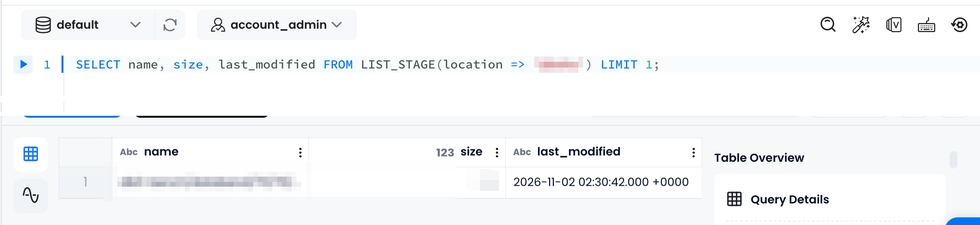
The worksheet result shows file metadata returned by the listing query.
A successful result confirms that this listing request worked.
LIST_STAGE
LIST
SELECT title::VARCHAR AS title,
       author::VARCHAR AS author,
       date::VARCHAR AS date
FROM @s3_books_role_stage/books.parquet
LIMIT 2;
Expect two book records. Then create a table and load the file:
CREATE TABLE books_iam_demo
(
    title VARCHAR,
    author VARCHAR,
    date VARCHAR
);

COPY INTO books_iam_demo
FROM @s3_books_role_stage
FILES = ('books.parquet')
FILE_FORMAT = (TYPE = 'PARQUET')
PURGE = FALSE;

SELECT * FROM books_iam_demo ORDER BY title;
The table should contain two rows.
PURGE = FALSE
At this point, the role has been used for both file access and an import. Subsequent processing continues through stages,
COPY INTO
Migrate Existing Access-Key Connections in Stages
Keep the old connection available while validating the new authorization. Switch dependencies after verification, then retire the old keys.
Create a Separate Role-Based Connection
Choose a connection name that existing jobs do not use. This migration example uses
OR REPLACE
CREATE OR REPLACE CONNECTION s3_books_role_conn
    STORAGE_TYPE = 's3'
    ROLE_ARN = 'arn:aws:iam::987***987:role/databend-docs-s3-role'
    EXTERNAL_ID = '<your-unique-external-id>'
    REGION = 'us-east-2';
Update the Stage and Recheck Access
A stage copies connection parameters when it is created. Changing the connection does not automatically update existing stages. For an existing stage named
s3_books_stage
DESC STAGE s3_books_stage;

ALTER STAGE s3_books_stage SET
    URL = 's3://databend-toronto/load/'
    CONNECTION = (CONNECTION_NAME = 's3_books_role_conn');
SET URL
CONNECTION
DESC STAGE s3_books_stage;
LIST @s3_books_stage;
Confirm that the URL is unchanged and that
LIST
Updating the URL and connection with ALTER STAGE requires v1.2.867 or later. On an older version, or when you want to leave an active stage untouched, create a separate stage, verify it, and then update job references:
CREATE STAGE s3_books_role_stage
    URL = 's3://databend-toronto/load/'
    CONNECTION = (CONNECTION_NAME = 's3_books_role_conn');

SELECT title, author, date
FROM @s3_books_role_stage/books.parquet
LIMIT 2;
If you already created this stage during the walkthrough, use a different unused name for the migration test.
Update External Tables Separately
For an external table that points directly to S3, update the connection on the table. Check its storage path and required permissions first: the read-only
load/
ALTER TABLE sales_data
    CONNECTION = (CONNECTION_NAME = 's3_books_role_conn');
This statement applies credential-related fields only. The table's bucket, region, and root remain unchanged.
Retire the Old Connection and Keys
Once all dependent stages, jobs, and users have migrated, inspect the connections and remove the old one:
SHOW CONNECTIONS;

DROP CONNECTION s3_books_conn;
Dropping a connection does not revoke AWS permissions or immediately invalidate credentials already issued by STS. Deactivate the old IAM user access key in AWS, monitor for remaining dependencies, and delete it after confirming that it is no longer needed.
Keep Authorization Tied to the Workload's Lifecycle
Temporary credentials still need protection while they are valid. A narrowly scoped permissions policy and an accurate trust policy remain necessary. Removing a trust relationship prevents new role assumptions but does not immediately invalidate existing STS sessions. For urgent revocation, follow AWS's role-session revocation procedure.
Start a migration with one read-only workload and validate its results before moving further dependencies. Record the role in your authorization inventory. When the workload is retired, review both its trust relationship and any active sessions so that unused access does not remain behind.
Further Reading
- Databend: AWS IAM role authentication
- Databend: Load data from an S3 bucket
- Databend: CREATE CONNECTION
- AWS: S3 access control explained (Chinese)
Subscribe to our newsletter
Stay informed on feature releases, product roadmap, support, and cloud offerings!