
Databend Data Ingestion Performance Test: From 3K rows/s to 2.3M rows/s - How to Choose Among 4 Methods
 wubxJan 4, 2026

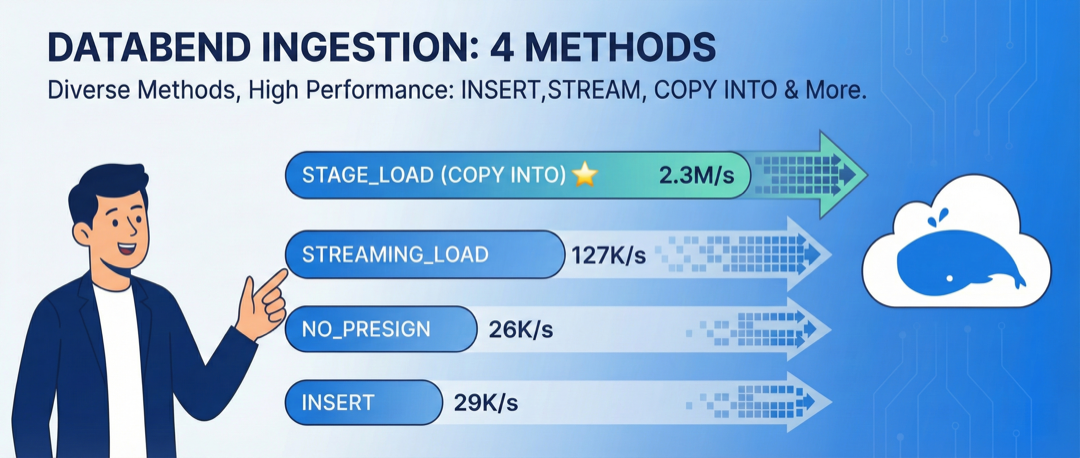
As a cloud-native lakehouse, Databend supports both on-premises and cloud deployments, offering 4 different data ingestion methods. This article explores the performance differences between these methods through testing and attempts to understand the design rationale behind them, helping you choose the most suitable ingestion method for your business scenario.
Databend's Supported Ingestion Methods
Databend provides 4 data ingestion methods suitable for different deployment scenarios:
1. INSERT (Bulk Insert with Presign)
Object storage can be directly accessed by applications, supporting presign mode. Suitable for cloud scenarios, taking full advantage of object storage's feature of not charging for data ingestion traffic.
Short name:
insert
2. INSERT_NO_PRESIGN
Object storage cannot be directly accessed by applications; data is forwarded through Databend nodes. Suitable for on-premises scenarios.
Short name:
insert_no_presign
3. STREAMING_LOAD
Supports direct streaming ingestion of common formats like CSV, NDJSON, and Parquet. This is a highly accepted approach for on-premises scenarios. Suitable for real-time data ingestion.
Short name:
streaming_load
4. STAGE_LOAD (Copy Into)
Batch loading based on object storage, capable of processing CSV, NDJSON, Parquet, ORC files and their compressed formats. This is the highest-performance cloud-native ingestion method.
Short name:
stage_load
💡 Tip: All four methods can be directly implemented via Java using
💻 Code Examples
1. INSERT (Bulk Insert)
Use Case: Cloud scenarios where object storage is accessible to applications
Properties props = new Properties();
props.setProperty("user", "root");
props.setProperty("password", "password");

try (Connection conn = DriverManager.getConnection("jdbc:databend://host:8000/db", props)) {
    conn.setAutoCommit(false);

    String sql = "INSERT INTO bench_insert (id, name, birthday, address, ...) VALUES (?, ?, ?, ?, ...)";

    try (PreparedStatement ps = conn.prepareStatement(sql)) {
        // Batch insert
        for (int i = 0; i < batchSize; i++) {
            ps.setLong(1, i);
            ps.setString(2, "name_" + i);
            ps.setString(3, "2024-01-01");
            ps.setString(4, "address_" + i);
            // ... Set other fields
            ps.addBatch();
        }

        ps.executeBatch();  // Execute batch insert
    }
}
Features:
- Uses presign URLs, data is written directly to object storage
- Suitable for cloud scenarios, reducing network costs
2. INSERT_NO_PRESIGN
Use Case: On-premises scenarios where object storage cannot be directly accessed by applications
Properties props = new Properties();
props.setProperty("user", "root");
props.setProperty("password", "password");
props.setProperty("presigned_url_disabled", "true");  // Key configuration: disable presign

try (Connection conn = DriverManager.getConnection("jdbc:databend://host:8000/db", props)) {
    conn.setAutoCommit(false);

    String sql = "INSERT INTO bench_insert (id, name, birthday, ...) VALUES (?, ?, ?, ...)";

    try (PreparedStatement ps = conn.prepareStatement(sql)) {
        for (int i = 0; i < batchSize; i++) {
            ps.setLong(1, i);
            ps.setString(2, "name_" + i);
            // ... Set other fields
            ps.addBatch();
        }

        ps.executeBatch();
    }
}
Features:
- Simply add to the connection string, no other changes neededpresigned_url_disabled=true
- Data is forwarded to object storage through Databend nodes
3. STREAMING_LOAD
Use Case: Real-time ingestion in on-premises scenarios, supporting multiple formats
import com.databend.jdbc.DatabendConnection;
import com.databend.jdbc.DatabendConnectionExtension;

Properties props = new Properties();
props.setProperty("user", "root");
props.setProperty("password", "password");

try (Connection conn = DriverManager.getConnection("jdbc:databend://host:8000/db", props)) {
    DatabendConnection databendConn = conn.unwrap(DatabendConnection.class);

    // Construct CSV data
    String csvData = """
        1,batch_1,name_1,2024-01-01,address_1,...
        2,batch_1,name_2,2024-01-01,address_2,...
        3,batch_1,name_3,2024-01-01,address_3,...
        """;

    byte[] payload = csvData.getBytes(StandardCharsets.UTF_8);

    try (InputStream in = new ByteArrayInputStream(payload)) {
        String sql = "INSERT INTO bench_insert FROM @_databend_load FILE_FORMAT=(type=CSV)";

        int loaded = databendConn.loadStreamToTable(
            sql,
            in,
            payload.length,
            DatabendConnectionExtension.LoadMethod.STREAMING
        );

        System.out.println("Loaded rows: " + loaded);
    }
}
Features:
- Uses special stage for direct streaming loading@_databend_load
- Supports CSV/NDJSON/Parquet/Orc formats
- Throughput rapidly improves with larger batches
4. STAGE_LOAD (Copy Into)
Use Case: Large-scale data loading with highest performance
import org.apache.opendal.AsyncOperator;

// 1. Create S3 Operator (using OpenDAL)
Map<String, String> conf = new HashMap<>();
conf.put("bucket", "my-bucket");
conf.put("endpoint", "http://s3-endpoint:9000");
conf.put("access_key_id", "access_key");
conf.put("secret_access_key", "secret_key");

try (AsyncOperator op = AsyncOperator.of("s3", conf);
     Connection conn = DriverManager.getConnection("jdbc:databend://host:8000/db", user, password)) {

    // 2. Create External Stage
    String createStage = """
        CREATE STAGE IF NOT EXISTS my_stage
        URL='s3://my-bucket/data/'
        CONNECTION=(
            endpoint_url = 'http://s3-endpoint:9000'
            access_key_id = 'access_key'
            secret_access_key = 'secret_key'
        )
        """;
    conn.createStatement().execute(createStage);

    // 3. Write data to object storage
    String csvData = "1,name1,2024-01-01,...\n2,name2,2024-01-01,...\n";
    byte[] payload = csvData.getBytes(StandardCharsets.UTF_8);
    op.write("batch_001.csv", payload).join();

    // 4. Use COPY INTO for batch loading
    String copySql = """
        COPY INTO bench_insert
        FROM @my_stage
        PATTERN='.*\\.csv'
        FILE_FORMAT=(type=CSV)
        PURGE=TRUE
        """;
    conn.createStatement().execute(copySql);
}
Features:
- Data is written to object storage first, then batch loaded, fully leveraging object storage's parallel capabilities
- Saves network costs in cloud scenarios (object storage read/write is free)
Test Plan
- Platform: A domestic trusted computing environment
- Tools: Java + databend-jdbc
The load testing program was auto-generated with AI assistance. For details, refer to the scripts: https://github.com/wubx/databend_ingestion/tree/main/db_ingestion
Table Schema
- Data: Mock data with 23 fields (including VARCHAR, DATE, TIMESTAMP types)
                CREATE OR REPLACE TABLE bench_insert (
                    id BIGINT,
                    batch VARCHAR,
                    name VARCHAR,
                    birthday DATE,
                    address VARCHAR,
                    company VARCHAR,
                    job VARCHAR,
                    bank VARCHAR,
                    password VARCHAR,
                    phone_number VARCHAR,
                    user_agent VARCHAR,
                    c1 VARCHAR,
                    c2 VARCHAR,
                    c3 VARCHAR,
                    c4 VARCHAR,
                    c5 VARCHAR,
                    c6 VARCHAR,
                    c7 VARCHAR,
                    c8 VARCHAR,
                    c9 VARCHAR,
                    c10 VARCHAR,
                    d DATE,
                    t TIMESTAMP
                )
Load Testing
for bt in  2000 3000 4000 5000 10000 20000 30000 40000 50000 100000 200000
do
	for type  in insert insert_no_presign streaming_load stage_load
	do
		echo $bt $type
		java -Dfile.encoding=UTF-8 -Dsun.stdout.encoding=UTF-8 -Dsun.stderr.encoding=UTF-8 -jar ./db_ingestion-1.0-SNAPSHOT-shaded.jar  $type  2000000 $bt
	done
done
Performance Analysis
INSERT vs STREAMING_LOAD Performance Comparison
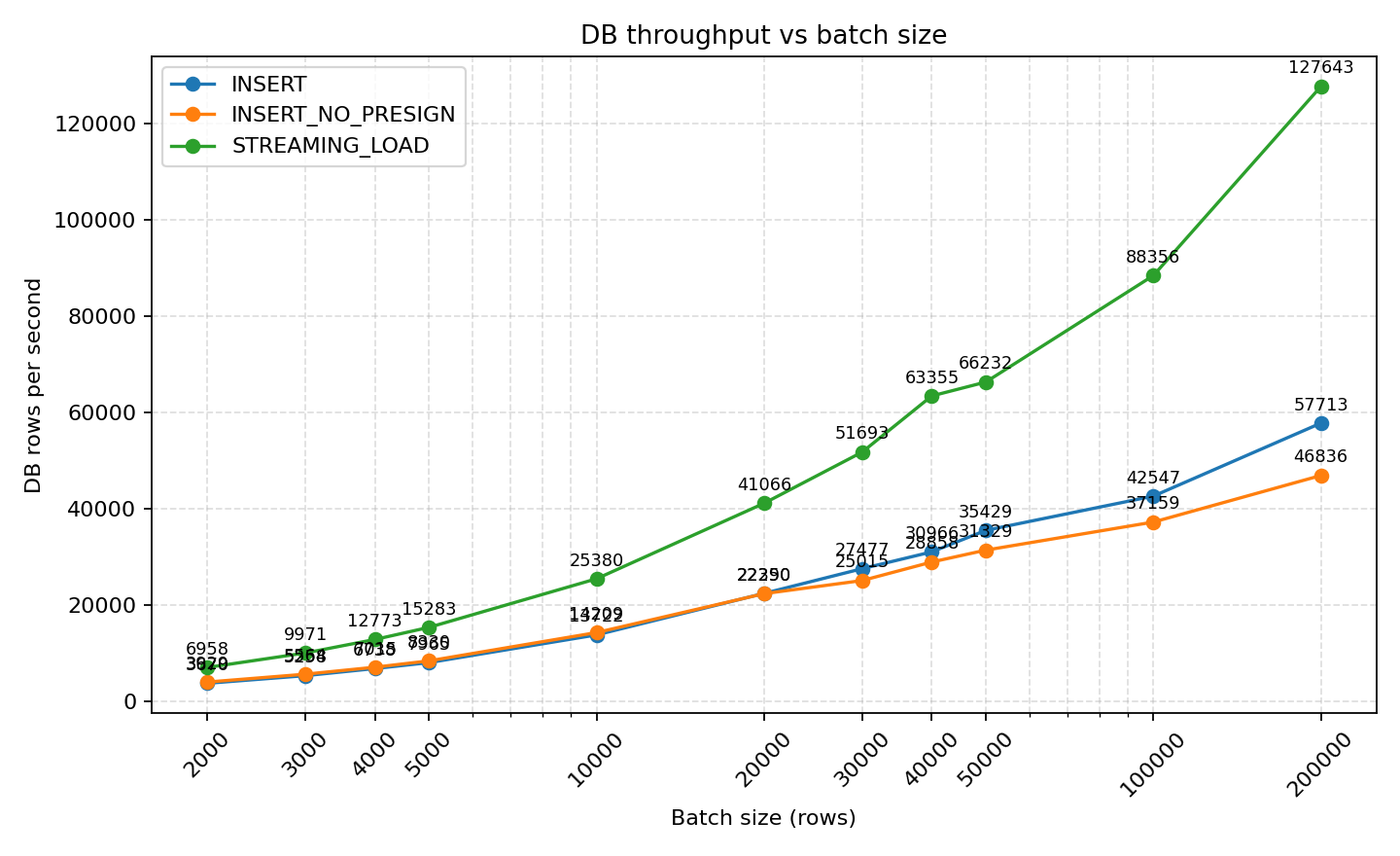
- STREAMING_LOAD's DB throughput rapidly improves with larger batches, from 6,958 rows/s with 2k batches to 127,643 rows/s with 200k batches, significantly outperforming INSERT (29,283 rows/s) and INSERT_NO_PRESIGN (26,121 rows/s) at the same batch sizes.
- INSERT and INSERT_NO_PRESIGN show acceptable differences at small batches (3,670 vs 3,929 rows/s at batch=2k), but they almost converge at ≥20k batches, and are consistently outperformed by the streaming approach.
Key Findings:
- STREAMING_LOAD DB throughput rapidly improves with larger batches:
- 2k batch: 6,958 rows/s
- 200k batch: 127,643 rows/s
- INSERT and INSERT_NO_PRESIGN show similar performance:
- Small difference at small batches (2k): 3,670 vs 3,929 rows/s
- Almost converge at ≥20k batches, with INSERT WITH Presign mode performing better as batch size increases
- At 200k batch: INSERT ~29,283 rows/s, INSERT_NO_PRESIGN ~26,121 rows/s
- Streaming_load overall outperforms INSERT and INSERT_NO_PRESIGN
STAGE_LOAD (Copy Into) Performance
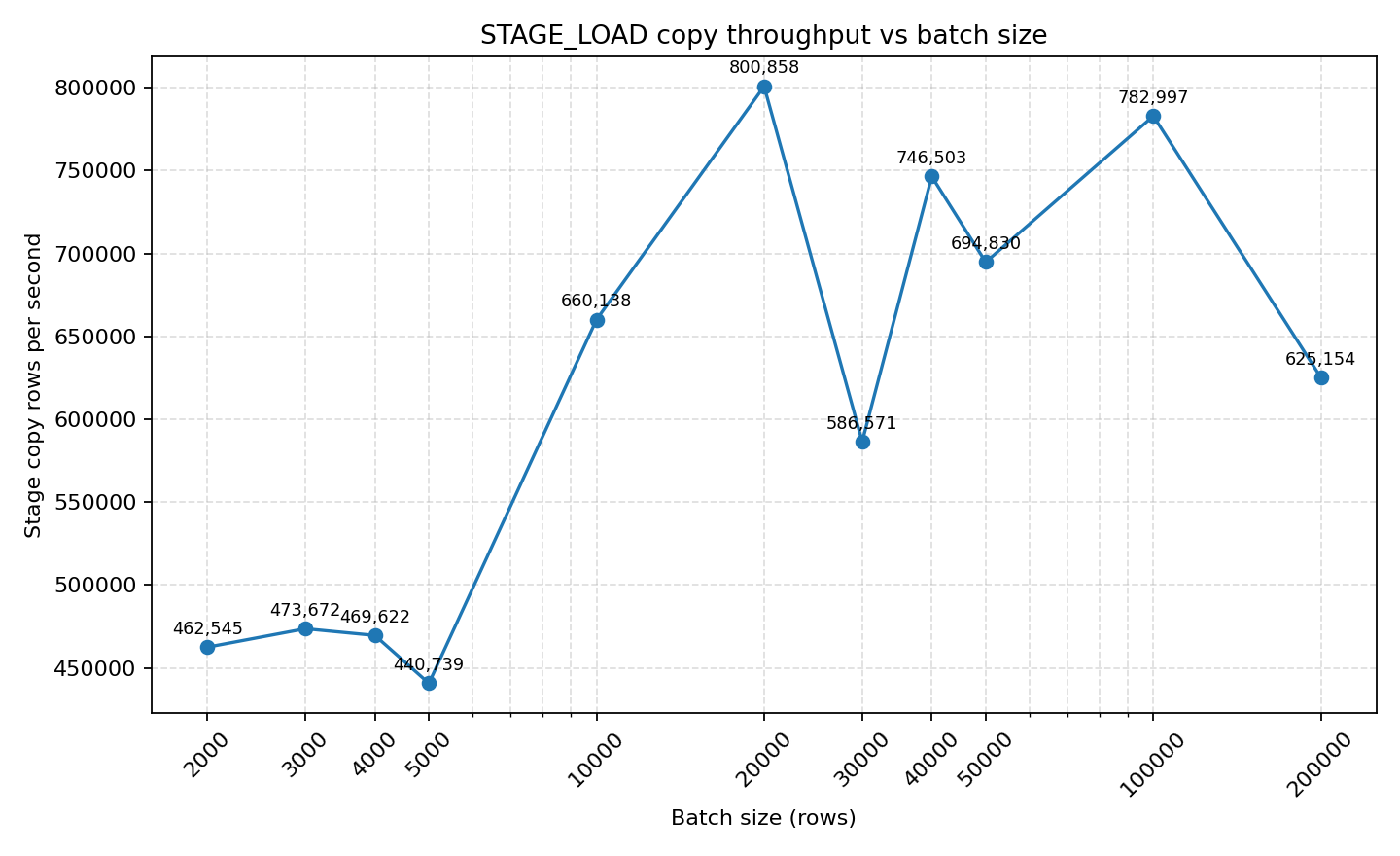
- STAGE_LOAD's COPY throughput is at a different magnitude: reaching 800k rows/s at batch=20k, stabilizing at 694k rows/s at 50k batches. Total time is more affected by stage writing + copy startup overhead, but single COPY throughput is unmatched.
Key Findings:
- COPY INTO is susceptible to network bandwidth bottlenecks
- Total time is affected by stage writing + copy startup overhead, but single COPY throughput is unmatched
Comprehensive Comparison of Four Methods
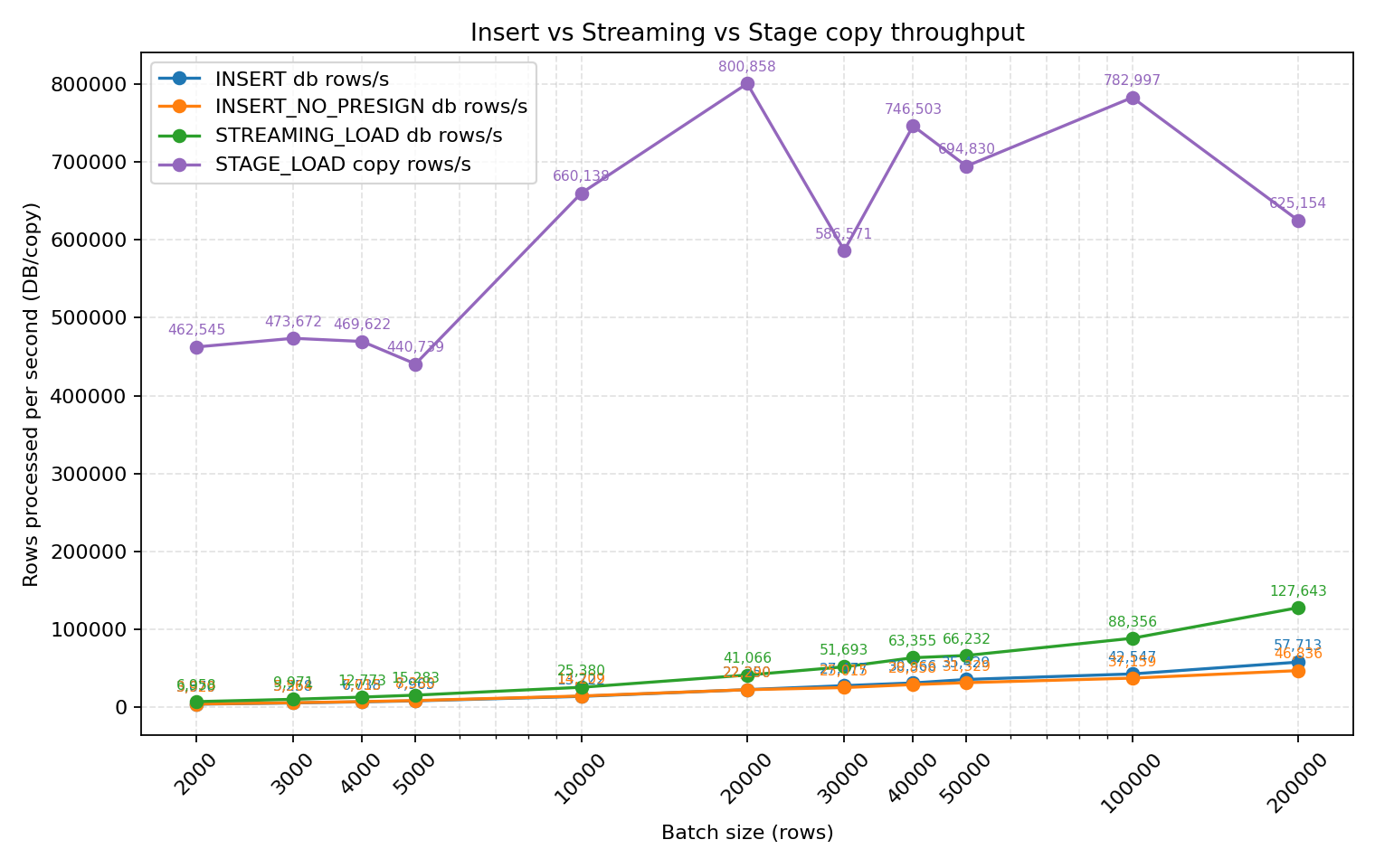
Comparing all four methods together, stage_load (copy into) is clearly the leader. In actual production environments with a 3-node cluster and sufficient data sources, COPY INTO can achieve ingestion speeds of 2.3M+ rows/second.
For copy into (stage_load) method, with sufficient data sources, achieving 1M+ rows per second is not a problem. For example: In a 3-node cluster with sufficient data: 2.3M+ rows/s ingestion speed. 10000 rows read in 84.816 sec. Processed 200.19 million rows, 143.15 GiB (2.36 million rows/s, 1.69 GiB/s)
Quick Comparison Table
| Method | Throughput | Use Case | Cloud Cost | Implementation |
|---|---|---|---|---|
| insert | ⭐⭐ | Cloud | Low | Simple |
| insert_no_presign | ⭐⭐ | On-premises | - | Simple |
| streaming_load | ⭐⭐⭐ | On-premises real-time | High | Medium |
| stage_load (copy into) | ⭐⭐⭐⭐⭐ | Large-scale batch load | Low | Medium |
How to Choose the Right Method
After reviewing the data above, everyone will ask: How should I choose? Should I pursue the highest-performing stage_load (copy into), or opt for convenience? For cloud scenarios, you must also consider "how to save money" (money-oriented programming is a required course for cloud development).
On-Premises Databend Data Ingestion Method Selection Guide
In on-premises environments, I usually recommend "whatever is convenient," as the first principle is to help developers deliver faster and make the business more stable. From the graphs above, you can see that all methods can easily achieve 30,000+ rows per second, and for massive data, millions of rows per second can be easily ingested, meeting business requirements.
- Without other constraints, keep it simple, but try to batch writes to reduce Databend's compaction overhead
- When object storage cannot be directly accessed by applications, choose between streaming_load or insert_no_presign. Between the two, insert_no_presign only requires adding to the connection string with no other configuration changes. If performance is still insufficient, consider streaming_load.presigned_url_disabled=true
- When a single machine's network card becomes a bottleneck, use stage_load with OpenDAL to write data to object storage first, then batch load; you can use multiple Databend nodes for parallel loading, and object storage itself can scale horizontally, easily achieving millions of rows per second.
Cloud Databend Data Ingestion Method Selection Guide
On-premises prioritizes convenience, while cloud prioritizes cost savings under performance requirements. Here, I recommend excluding insert_no_presign and streaming_load, as both may trigger cross-VPC traffic charges with higher costs. For cloud, I recommend:
- Bulk insert
- stage_load (copy into)
Both methods leverage object storage to temporarily store data before writing, taking advantage of object storage's feature of not charging for writes from any location, helping users reduce cloud costs. In cloud environments, users often leverage Databend's task + copy into to achieve second-level loading, implementing near real-time data ingestion.
⚠️ Cloud Pitfall Warning:
Not Recommended: INSERT_NO_PRESIGN and STREAMING_LOAD
- Reason: These two methods may trigger cross-VPC traffic charges with higher costs
When helping cloud users build or transform lake warehouses, Databend has found that many customers have surprisingly high traffic costs for data lake ingestion and reading, which can be avoided. If you find your cloud traffic costs are also high, you can contact Databend for analysis.
Best Practice:
In the cloud, users often leverage Databend's task + copy into to achieve second-level data loading, implementing near real-time data ingestion.
-- Example: Create a scheduled task to load data every minute
CREATE TASK auto_ingest_task
  WAREHOUSE = 'default'
  SCHEDULE = 1 MINUTE
AS
  COPY INTO target_table
  FROM @my_stage
  PATTERN = '.*\.csv'
  FILE_FORMAT = (type = CSV)
  PURGE = TRUE;
This approach fully leverages cloud object storage's feature of not charging for data ingestion, and also benefits from Databend's feature of not charging traffic fees when reading from object storage in the same region.
Conclusion
This load testing demonstrates that Databend's different ingestion methods form a clear gradient between performance, cost, and implementation complexity: streaming_load achieves a better balance between real-time performance and throughput, while stage_load has absolute advantages in throughput and can reduce cloud costs through object storage. Therefore, when implementing solutions, it's recommended to first evaluate business real-time requirements, network topology, and budget constraints, then choose between INSERT, STREAMING_LOAD, and STAGE_LOAD. Through proper batch settings and automated task scheduling, you can achieve stable ingestion capabilities while ensuring optimal ROI.
From on-premises to cloud, the decision logic for data ingestion has changed: it's no longer just about performance competition, but about finding the optimal balance between performance and cost. Choosing the right method not only ensures performance but can also significantly reduce cloud costs. After reading the above content, how would you choose among Databend's 4 ingestion methods?
If this article helps you, please:
- ⭐ Star https://github.com/databendlabs/databend
- 💬 Share your use cases and optimization experiences in Issues
- 📢 Share with more friends who need this
Subscribe to our newsletter
Stay informed on feature releases, product roadmap, support, and cloud offerings!